
OSI Model vs TCP/IP Model: A CCNA Layer-by-Layer Guide

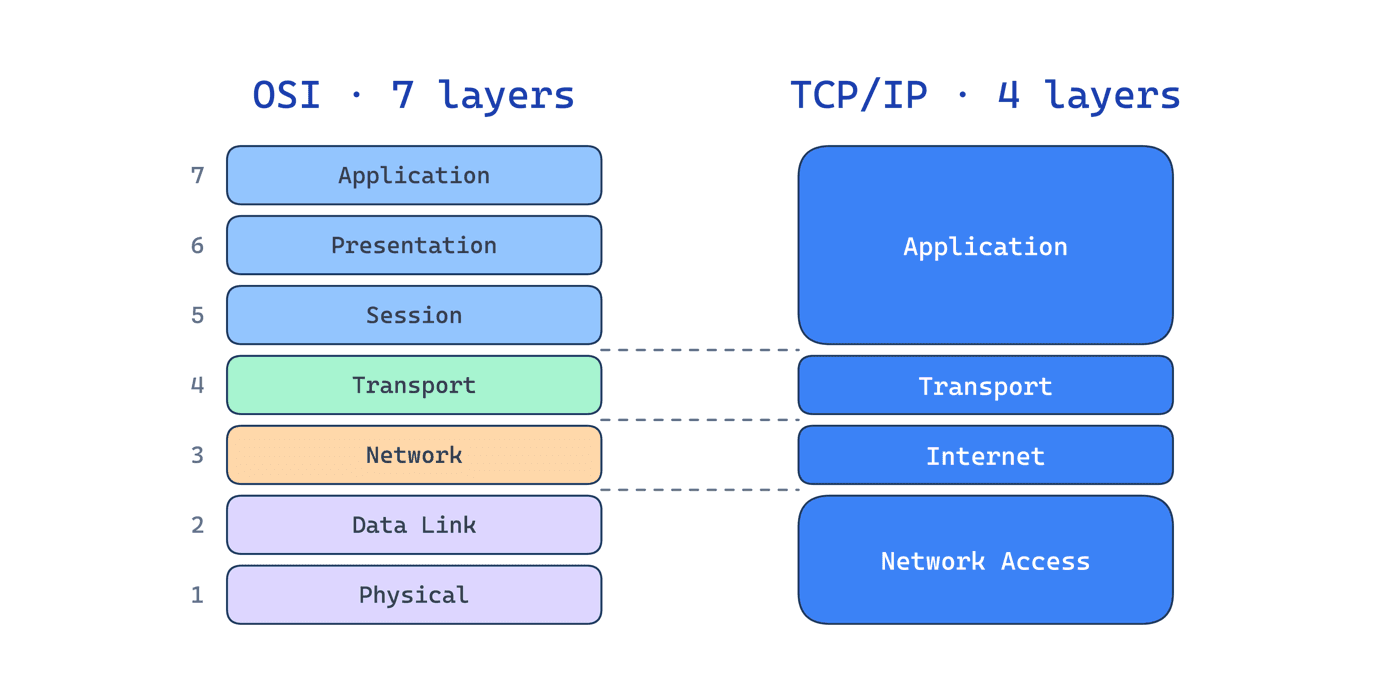
Every networking concept you will ever learn, from a CCNA exam question to a 2 a.m. production outage, maps back to one of two reference models: the OSI model or the TCP/IP model. Understanding both is not academic box-ticking. It is the mental framework that lets you isolate exactly where a problem lives instead of guessing.
This guide breaks down both models layer by layer, shows how they map to each other, and explains why the OSI model is still the language network engineers use to troubleshoot, even though the internet actually runs on TCP/IP.
What Is the OSI Model?
The Open Systems Interconnection (OSI) model is a seven-layer conceptual framework published by the ISO in 1984. It describes how data moves from an application on one device, across a network, to an application on another, split into seven distinct layers, each with a single responsibility.
The power of the model is separation of concerns: each layer only talks to the layer directly above and below it, so a fault at one layer can be diagnosed without untangling the whole stack.
| Layer | Name | Job | Examples / PDU |
|---|---|---|---|
| 7 | Application | Interface to the user's app | HTTP, DNS, SMTP, Data |
| 6 | Presentation | Encoding, encryption, compression | TLS, JPEG, ASCII, Data |
| 5 | Session | Opens, maintains, closes sessions | RPC, NetBIOS, Data |
| 4 | Transport | End-to-end delivery, ports | TCP, UDP, Segment |
| 3 | Network | Logical addressing and routing | IP, ICMP, OSPF, Packet |
| 2 | Data Link | Local delivery on one link, MAC | Ethernet, ARP, switches, Frame |
| 1 | Physical | Bits on the wire | Cables, fiber, radio, Bits |
A Mnemonic That Sticks
Top to bottom (Layer 7 to 1): All People Seem To Need Data Processing. Bottom to top (1 to 7): Please Do Not Throw Sausage Pizza Away. On the CCNA exam you will be asked which layer a protocol or device lives at, these get you there in seconds.
What Is the TCP/IP Model?
The TCP/IP model, also called the Internet Protocol Suite, is the model the internet actually runs on. It predates the formal OSI standard and is more practical: four layers instead of seven, defined around the protocols that were actually built rather than an idealized abstraction.
| Layer | Name | Maps to OSI | Examples |
|---|---|---|---|
| 4 | Application | OSI 5, 6, 7 | HTTP, DNS, TLS, SMTP |
| 3 | Transport | OSI 4 | TCP, UDP |
| 2 | Internet | OSI 3 | IP, ICMP |
| 1 | Network Access | OSI 1, 2 | Ethernet, Wi-Fi, ARP |
OSI vs TCP/IP: How They Map
The two models describe the same journey, they just slice it differently. TCP/IP collapses OSI's top three layers (Application, Presentation, Session) into a single Application layer, and OSI's bottom two (Data Link, Physical) into one Network Access layer.
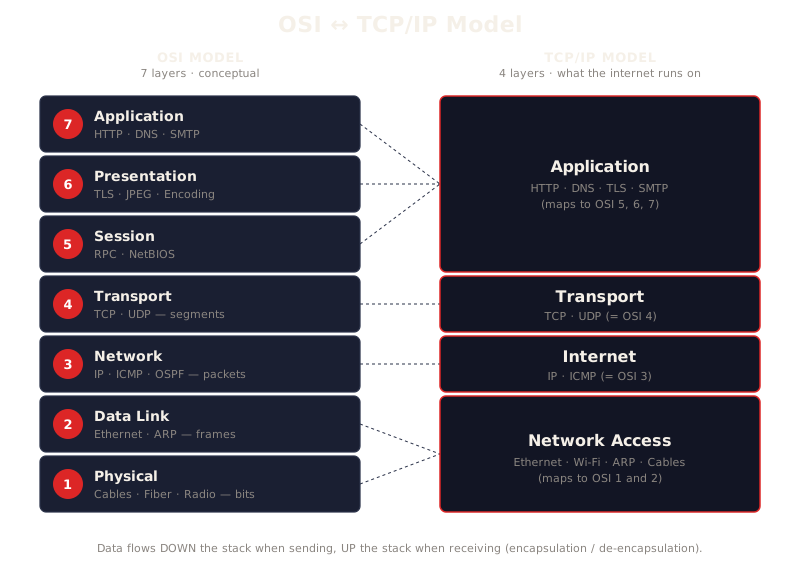
| OSI (7 layers) | TCP/IP (4 layers) |
|---|---|
| 7 Application, 6 Presentation, 5 Session | Application |
| 4 Transport | Transport |
| 3 Network | Internet |
| 2 Data Link, 1 Physical | Network Access |
The practical takeaway: engineers speak in OSI ("that is a Layer 2 problem", "it is a Layer 7 issue") because seven layers give precise vocabulary, but the packets on your network are structured by TCP/IP.
How Data Actually Flows: Encapsulation
When you send data, it travels down the stack on your device and up the stack on the receiver. At each layer going down, a header is added, this is encapsulation:
- Transport wraps your data in a TCP segment (adds port numbers)
- Network wraps that in an IP packet (adds source and destination IP)
- Data Link wraps that in a frame (adds MAC addresses)
- Physical converts the frame to bits and transmits
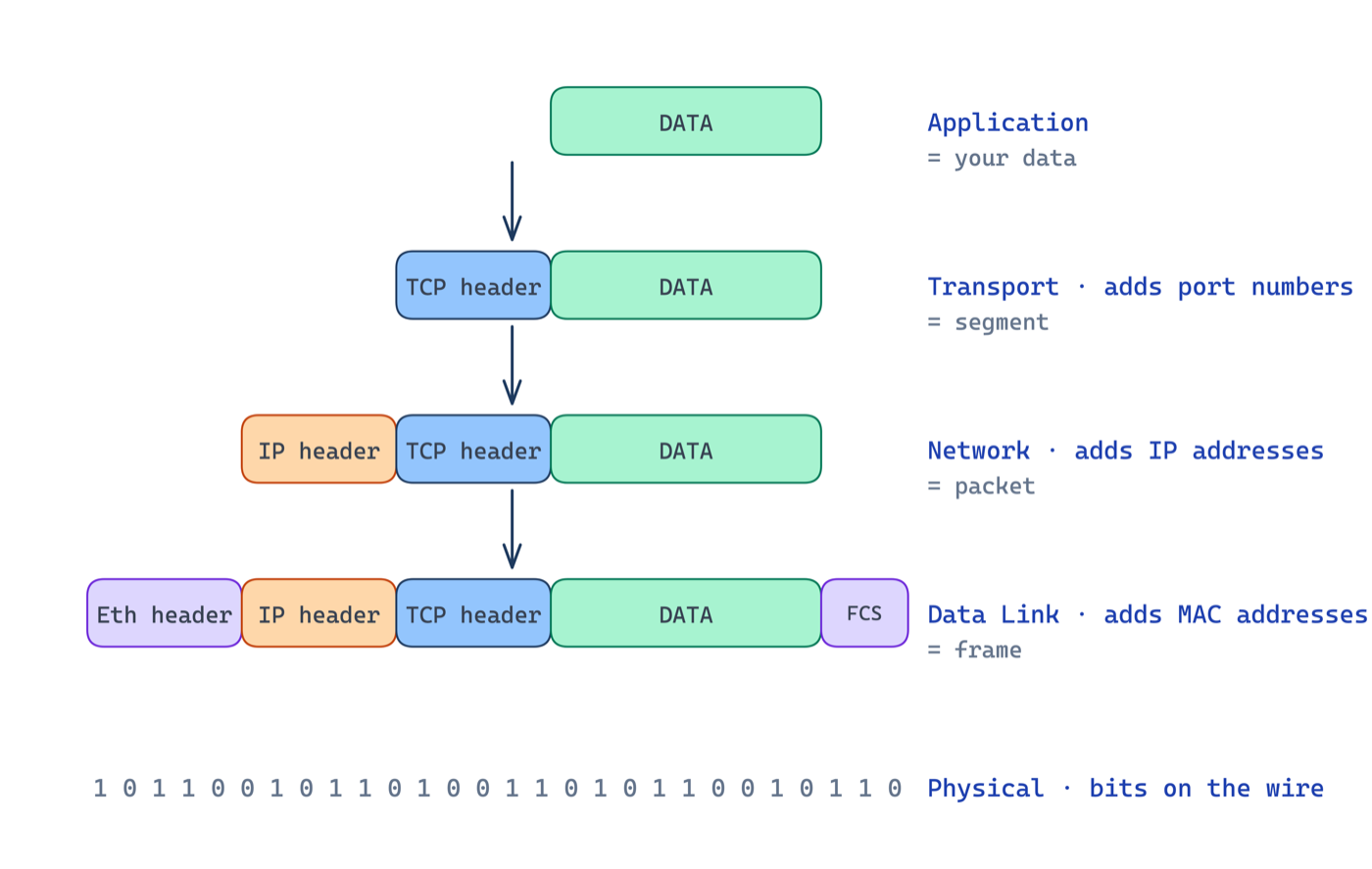
The receiver reverses the process, de-encapsulation, stripping one header per layer until the application gets the original data. Knowing the PDU name at each layer (segment, packet, frame, bits) is a guaranteed CCNA exam question.
Why This Matters for Troubleshooting
The models turn a vague problem into a checklist. "The website will not load" becomes:
- Layer 1: Is the cable plugged in? Link light on?
- Layer 2: Is the switch port up? Correct VLAN?
- Layer 3: Can you ping the gateway? Is there a route?
- Layer 4: Is the port open? Is a firewall blocking it?
- Layer 7: Is DNS resolving? Is the application itself up?
Working layer by layer is how senior engineers isolate faults fast, and it is exactly the reasoning the CCNA 200-301 exam tests. If you are preparing for it, our live CCNA training drills this troubleshooting model with hands-on labs until it is second nature.
The Bottom Line
Learn the OSI model for the language of networking and the precision it gives you in troubleshooting. Understand the TCP/IP model because it is what your packets are actually built on. Master how the two map to each other, and you will have the single most reusable mental model in all of networking, the foundation everything from CCNA to CCIE builds on.
Frequently Asked Questions
Is the OSI model still used today?
As a teaching and troubleshooting vocabulary, yes, engineers say "layer 2 problem" or "layer 7 issue" every day. As an implemented protocol stack, no: real networks run TCP/IP. Learn OSI for communication and troubleshooting structure, TCP/IP for how packets actually move.
Which OSI layers matter most for the CCNA?
Layers 2, 3, and 4 carry most CCNA questions: switching happens at layer 2 (MAC addresses), routing at layer 3 (IP addresses), and TCP/UDP behaviour at layer 4. Knowing which devices and protocols live at each layer matters more than reciting the mnemonic.
What is the difference between TCP/IP's 4 layers and OSI's 7?
TCP/IP collapses OSI's application, presentation, and session layers into a single application layer, and merges physical and data link into the network access layer. Nothing is lost, the detail just lives in protocol specifications instead of model layers.


