
How OSPF Works: Areas, LSAs and the SPF Algorithm (CCNA)

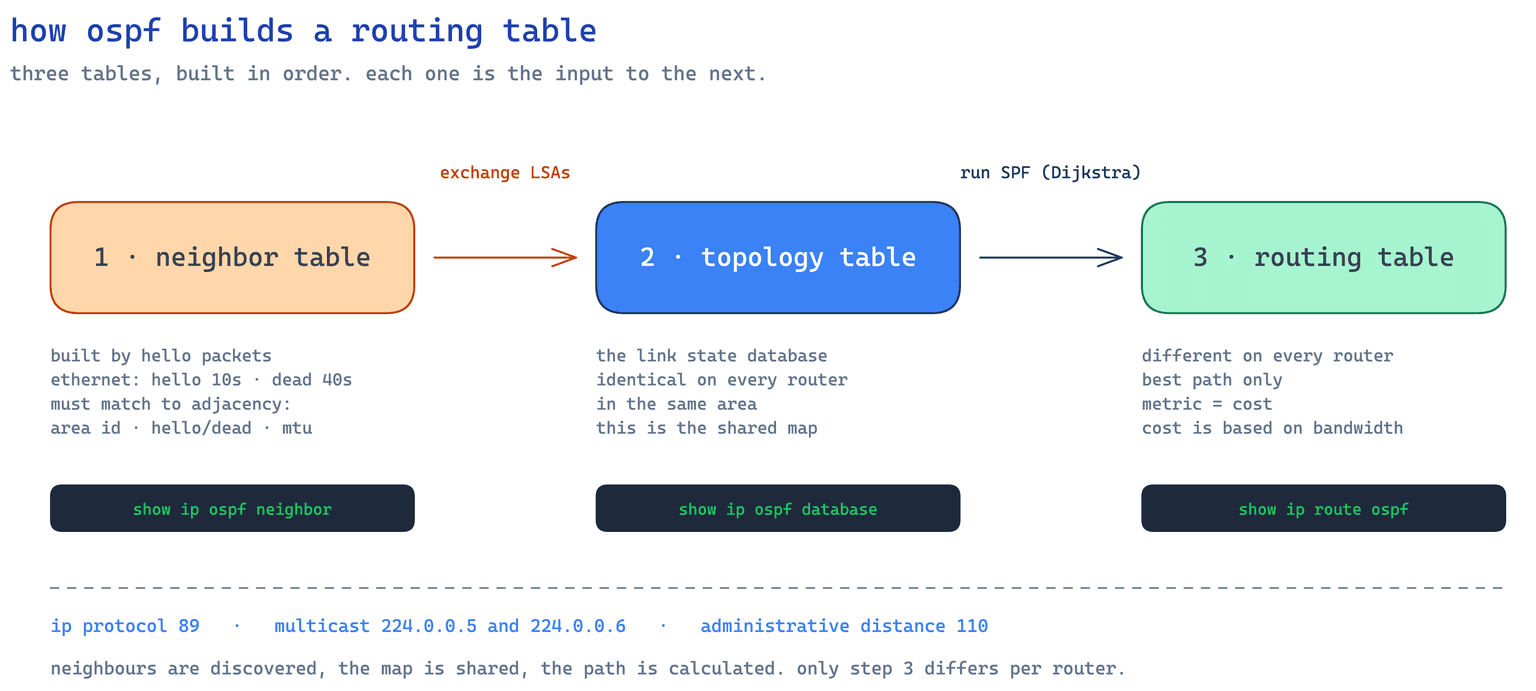
OSPF is a link state interior gateway protocol: it rides on IP as protocol 89, has an administrative distance of 110, and chooses paths by cost derived from bandwidth. Every router floods LSAs, builds an identical map of its area, then runs Dijkstra over that map with itself as the root.
Most CCNA candidates can configure OSPF long before they can explain it. They type router ospf 1, paste a network statement, watch the neighbours come up and move on. Then the exam asks why a router picked one path, or why two routers that ping fine refuse to peer, and the configuration knowledge runs out.
I am Mani Poopal, CCIE certified, twenty plus years in enterprise networking and a former Fortune 500 network architect. I teach CCNA at CISNET, and the neighbour states, MTU and reference bandwidth sections below are what I unstick in the lab room every cohort.
What OSPF is
Open means an IETF standard rather than a vendor protocol, specified for OSPFv2 in RFC 2328, which is why it turns up where EIGRP cannot go. Shortest path first is the algorithm: every router builds a complete map of its area, then calculates the best path across it. Distance vector protocols only know what neighbours report, which is why OSPF converges faster and loops less.
The numbers worth memorising:
| Property | Value |
|---|---|
| IP protocol number | 89 |
| Multicast addresses | 224.0.0.5 (all routers), 224.0.0.6 (DR and BDR) |
| Hello interval, ethernet | 10 seconds |
| Dead interval, ethernet | 40 seconds |
| Administrative distance | 110 |
| Metric | Cost, from interface bandwidth |
89 is a protocol number, not a port: OSPF rides on IP directly, as does EIGRP at 88. Our ports and protocols lookup covers the distinction.
The three tables
OSPF builds three tables in order, each feeding the next.
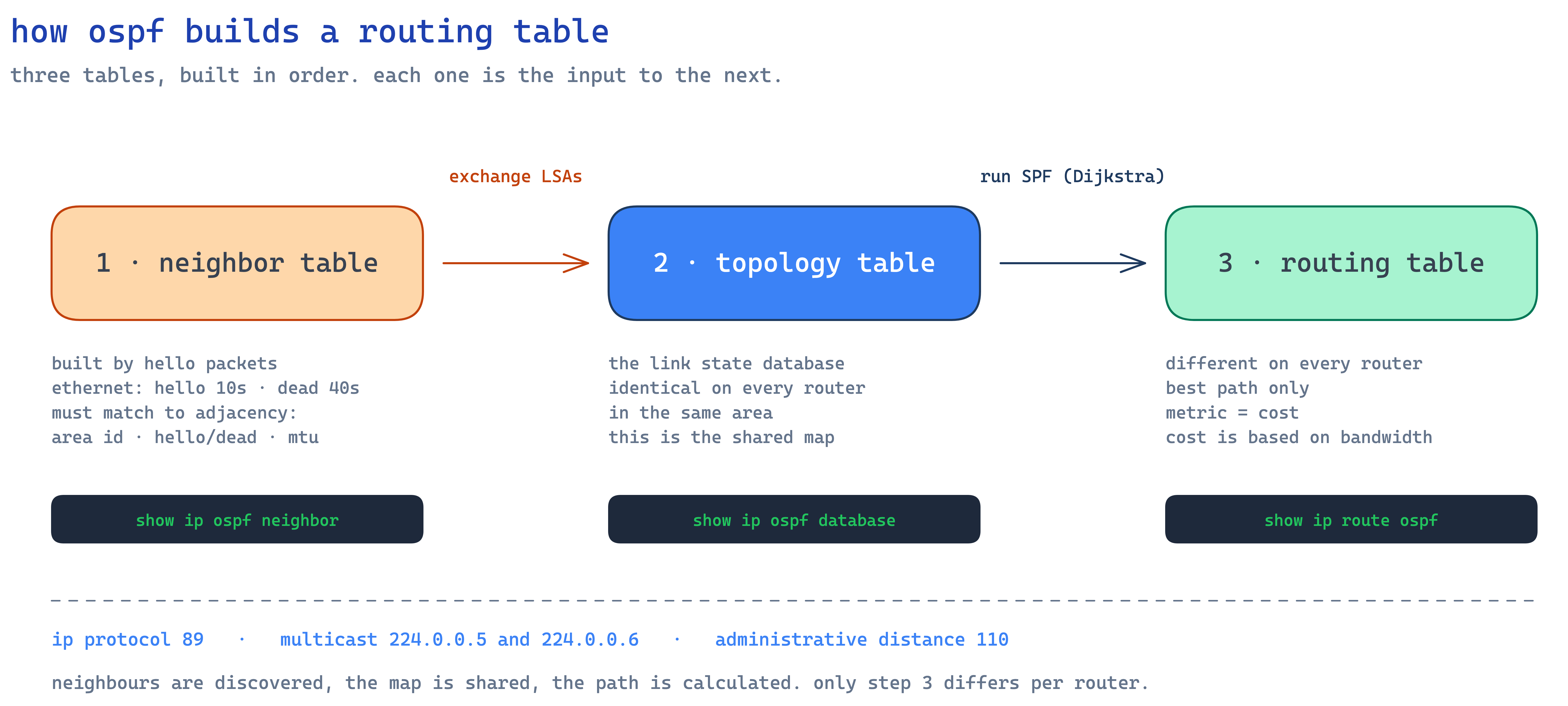
The neighbor table is built by hello packets. On ethernet a router hellos every 10 seconds and declares a neighbour dead after 40 seconds of silence. Check show ip ospf neighbor.
The topology table, more properly the link state database, is built by flooding LSAs (link state advertisements) between neighbours. This is the shared map, and here is the part students miss: within an area it is identical on every router. If R1 and R4 are in area 0, their databases match. Check show ip ospf database.
The routing table is what SPF produces. Each router runs SPF, also called Dijkstra's algorithm, over that shared map with itself as the root. Because the root differs the result differs, so this is the only table unique per router. Check show ip route ospf. The database is shared, the routing table is not, and exams test that distinction.
Reading the verification output
Here is what each returns on a four router lab; the values are representative, not a production capture.
R1# show ip ospf neighbor

Neighbor ID   Pri   State          Dead Time   Address      Interface
2.2.2.2         1   FULL/BDR       00:00:33    10.1.12.2    GigabitEthernet0/0
3.3.3.3         1   FULL/DR        00:00:37    10.1.12.3    GigabitEthernet0/0
4.4.4.4         0   2WAY/DROTHER   00:00:31    10.1.12.4    GigabitEthernet0/0
Read the State column first: it carries the adjacency state and the neighbour's role, split by a slash. FULL/BDR and FULL/DR are healthy, and so is 2WAY/DROTHER, the most misread line in the protocol, because R1 is itself a DROther and stops at 2-Way with the other one by design. Only point-to-point links and DR or BDR pairs reach FULL. Dead Time should reset to 00:00:40 on every hello; if it falls past 00:00:10 and keeps falling, hellos are not arriving, which is cabling, an ACL or a mismatched hello interval, not OSPF.
R1# show ip ospf database

       OSPF Router with ID (1.1.1.1) (Process ID 1)

              Router Link States (Area 0)

Link ID      ADV Router   Age    Seq#         Link count
1.1.1.1      1.1.1.1      412    0x80000005   3
2.2.2.2      2.2.2.2      398    0x80000004   3
3.3.3.3      3.3.3.3      401    0x80000006   4
4.4.4.4      4.4.4.4      405    0x80000003   2

              Net Link States (Area 0)

Link ID      ADV Router   Age    Seq#
10.1.12.3    3.3.3.3      401    0x80000002
Run the same command on R2 and the lists match line for line: same Link IDs, same advertising routers, same sequence numbers. That is the identical-database claim made concrete. Router Link States are Type 1 LSAs, Net Link States the Type 2 the DR creates, and Age climbs until the originator refreshes at 1800 seconds.
R1# show ip route ospf

      10.0.0.0/8 is variably subnetted, 6 subnets, 2 masks
O        10.1.23.0/24 [110/2] via 10.1.12.2, 00:14:22, GigabitEthernet0/0
O IA     10.2.5.0/24 [110/3] via 10.1.12.2, 00:09:41, GigabitEthernet0/0
O E2     192.0.2.0/24 [110/20] via 10.1.12.2, 00:04:15, GigabitEthernet0/0
Three codes, three LSA origins. Plain O is intra-area, from a Type 1 or Type 2 LSA. O IA is inter-area, from a Type 3 LSA sent by an Area Border Router. O E2 is external, from a Type 5 LSA sent by an ASBR, and E2 holds the seed cost across the domain instead of accumulating, which is why it reads 20. The bracketed [110/2] is administrative distance over metric: 110 is always OSPF, 2 is the summed outbound interface cost.
OSPF neighbor states
Adjacencies build in a fixed sequence, and where they stall tells you what to fix. This is the table I whiteboard in every cohort.
| State | What just happened | What a stall here means |
|---|---|---|
| Down | No hello received | Interface, cabling, or OSPF not enabled |
| Attempt | Unicast hello sent, NBMA only | Wrong neighbour statement |
| Init | A hello arrived without this router's ID | One-way hellos: an ACL or wrong subnet mask |
| 2-Way | Both see each other, DR elected | Permanent between DROthers. Not a fault |
| ExStart | Master and slave chosen | MTU mismatch, almost always |
| Exchange | Database description packets flowing | MTU mismatch again |
| Loading | Requesting missing LSAs | Rare. Corrupted or oversized database |
| Full | Databases synchronised | Healthy end state with a DR, BDR or point-to-point peer |
Two of these cause nearly all real tickets. Stuck in INIT means one-way hellos, and the fastest check is whether both interfaces sit in the same subnet with the same mask. Stuck in EXSTART or EXCHANGE means MTU, and the version that bites in production is a GRE tunnel, whose interface defaults to an IP MTU of 1476 over a physical 1500. Everything pings, the adjacency never completes, and it sits there until someone compares show interface.
Why adjacencies fail
Two routers can ping perfectly and never become neighbours. Four things must match:
- Area ID. Both interfaces in the same area.
- Hello and dead intervals. Not negotiated, so they have to be equal.
- MTU. A mismatch hangs the adjacency in EXSTART or EXCHANGE.
- Authentication, where configured.
What does not have to match is the process ID. In router ospf 1, that 1 is locally significant: R1 can run process 1 and R2 process 50 and they peer happily. Compare EIGRP, where the autonomous system number must match everywhere. I ask this in class deliberately, because copying one process number onto every lab router teaches the wrong lesson.
Router ID
Every router identifies itself with a 32-bit router ID shaped like an IP address, chosen this way:
- A manually configured
router-idunder the OSPF process. - Otherwise the highest IP on any active loopback.
- Otherwise the highest IP on any active physical interface.
Set it manually. Otherwise it changes when an interface drops or a loopback appears, and that rebuilds every adjacency. A loopback is preferred because it never goes down.
router ospf 1
 router-id 1.1.1.1
Areas and why Area 0 exists
A small network can run in a single area, and that area should be area 0, the backbone. Once it grows, a single area means every router reruns SPF across the whole topology whenever any link flaps. Multiple areas contain that: a change in area 1 does not force area 2 to rerun SPF over area 1's detail.
The rule that follows is the one the exam tests. Every non-backbone area must connect to area 0. Area 1 cannot attach to area 2 and reach the backbone indirectly. A router with one interface in area 1 and one in area 0 is an Area Border Router. This is hierarchical routing, the reason OSPF scales better than a flat protocol.
LSA types
LSAs are the units the database is made of. The type tells you who originated a route and how far it travels.
| Type | Name | Originated by | Flooding scope |
|---|---|---|---|
| 1 | Router LSA | Every OSPF router | Within its own area only |
| 2 | Network LSA | The DR on a multi-access segment | Within that area only |
| 3 | Summary LSA | Area Border Router | Into other areas, carrying prefixes |
| 4 | ASBR Summary LSA | Area Border Router | Into other areas, locating the ASBR |
| 5 | AS External LSA | Autonomous System Boundary Router | Whole domain, except stub areas |
| 7 | NSSA External LSA | ASBR inside a not-so-stubby area | Within the NSSA, converted to Type 5 by an ABR |
Pull one type out with show ip ospf database router, network, summary or external.
At CCNA level the work sits in Types 1 and 2, because a single-area lab produces only those and Type 2 is what the DR exists to create. The rest appear once a topology grows a second area or pulls in outside routes, which is where route redistribution takes over. Recognising the codes in show ip route ospf matters more than reciting the table.
Cost, and how the best path is chosen
OSPF's metric is cost, and the formula is one division:
cost = reference bandwidth (bps) / interface bandwidth (bps)The default reference bandwidth is 100,000,000 bps. The result truncates to a whole number with a minimum of 1, giving the default table:
| Interface | Bandwidth | Default cost |
|---|---|---|
| 64 kbps serial | 64,000 bps | 1562 |
| T1 serial | 1,544,000 bps | 64 |
| Ethernet | 10 Mbps | 10 |
| FastEthernet | 100 Mbps | 1 |
| GigabitEthernet | 1 Gbps | 1 |
| TenGigabitEthernet | 10 Gbps | 1 |
Worked example. R1 needs 10.5.5.0/24 and has two options:
- Path A, one hop: a single T1 serial link. Cost 64.
- Path B, three hops: three FastEthernet links in series. Cost 1 + 1 + 1 = 3.
Path B wins despite crossing three routers instead of one. OSPF sums outbound interface costs and never counts hops, the exact difference between it and RIP. It ignores load, delay and reliability too, unlike EIGRP, so the two can pick different paths across one topology.
Now look at the last three rows. At the default reference, FastEthernet, Gigabit and TenGig all cost 1, so OSPF cannot tell them apart. Production networks fix that with `auto-cost reference-bandwidth 10000`, moving the reference to 10 Gbps so Gigabit costs 10, FastEthernet 100 and TenGig 1.
That command carries a trap I have watched bite more than one migration. It is locally significant, so raise it on some routers and not others and the two groups compute different costs over the same links, sending traffic down a path nobody designed. Change it everywhere in one window, or not at all.
Cost compares two OSPF paths. Administrative distance, 110 for OSPF, compares OSPF against another source of the same route, which is why a static route at AD 1 beats an OSPF route however good its path.
Two ways to configure it
The classic method enables OSPF from the routing process with a network statement:
router ospf 1
 router-id 1.1.1.1
 network 192.168.1.0 0.0.0.255 area 0
The wildcard mask catches people out. It is the inverse of the subnet mask, so a /24 becomes 0.0.0.255, and it does not define a subnet, it selects which interfaces run OSPF. Our wildcard mask calculator generates the line.
The newer method enables OSPF directly on the interface:
interface GigabitEthernet0/0
 ip ospf 1 area 0
Both appear on the CCNA 200-301. The interface method is clearer in production, because the interface itself shows whether OSPF is on.
DR and BDR
On a broadcast segment, every router going full with every other would mean heavily duplicated flooding. OSPF elects a Designated Router and a Backup Designated Router instead: everyone goes full with those two and stays at 2-Way with the rest.
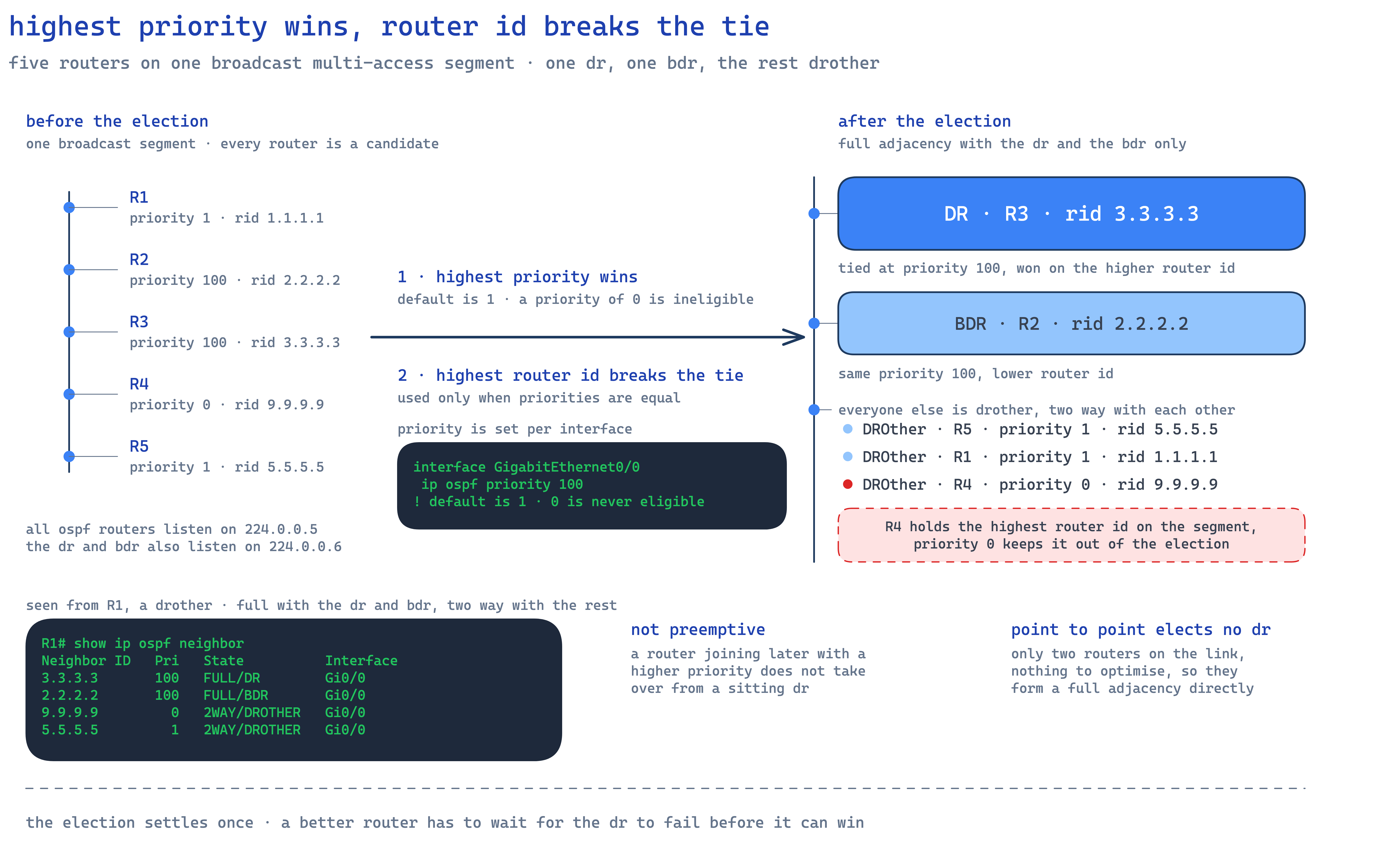
The election, visible in `show ip ospf interface`, runs on:
- Highest priority. Default 1, set with
ip ospf priority. Priority 0 makes a router ineligible. - Highest router ID, as the tiebreaker when priorities are equal.
It is not preemptive, so a better-priority router joining later does not take over, and point-to-point links elect no DR at all.
Frequently Asked Questions
What are the OSPF neighbor states in order?
Down, Attempt, Init, 2-Way, ExStart, Exchange, Loading, Full. Attempt applies only to non-broadcast links with manual neighbours, so on ethernet the sequence is Down, Init, 2-Way, ExStart, Exchange, Loading, Full. Two DROthers on one segment stop permanently at 2-Way by design, which is healthy rather than a failure.
Why is my OSPF neighbor stuck in EXSTART?
Almost always an MTU mismatch. The routers get far enough to exchange database description packets, then fail because one side cannot accept the other's packet size. GRE tunnels are the common case, defaulting to an IP MTU of 1476 against a physical 1500. Compare show interface on both ends, then fix the MTU or use ip ospf mtu-ignore as a last resort.
How is OSPF cost calculated?
Cost equals the reference bandwidth divided by the interface bandwidth, both in bits per second, truncated with a minimum of 1. With the default 100,000,000 bps reference, a T1 costs 64 and a FastEthernet costs 1. A path costs the sum of its outbound interfaces, which is why three FastEthernet hops at cost 3 beat one T1 hop at 64.
What are the OSPF LSA types?
Type 1 Router LSAs come from every router and stay in their area. Type 2 Network LSAs come from the DR of a multi-access segment and also stay in the area. Type 3 Summary and Type 4 ASBR Summary LSAs come from Area Border Routers and cross between areas. Type 5 AS External LSAs come from an ASBR and flood the domain except stub areas. Type 7 NSSA External LSAs carry externals inside an NSSA until an ABR converts them to Type 5.
Do OSPF process IDs have to match between routers?
No. The process ID in router ospf 1 is locally significant, so two routers with different process IDs peer without complaint. What must match is the area ID, the hello and dead intervals, the MTU and any authentication. This is the opposite of EIGRP, where the autonomous system number must be identical everywhere.
What is the difference between OSPF cost and administrative distance?
Cost is OSPF's internal metric, calculated from bandwidth, and it compares OSPF paths with each other. Administrative distance is 110 for OSPF and compares an OSPF route against the same route learned another way. If a static route and an OSPF route both describe 10.0.0.0/8, administrative distance decides which is installed; cost never enters into it.
Why does every OSPF area have to connect to Area 0?
To prevent routing loops and keep inter-area routing predictable. Loop prevention between areas relies on all inter-area traffic passing through the backbone, so distance-vector-like behaviour applies between areas rather than a full link state view. If area 1 could reach area 2 without touching area 0, that guarantee breaks. Where topology makes that impossible, a virtual link tunnels through an intermediate area, but it is a workaround.
Practising this
The fastest way to make this stick is to break it on purpose: mismatch the MTUs, watch the pair hang in EXSTART, then fix it. We run that in the CCNA lab block, and our CCNA practice questions test the theory.
Sources
- RFC 2328, OSPF Version 2, IETF
- RFC 3101, The OSPF NSSA Option, IETF
- Understand OSPF Neighbor States, Cisco
- Troubleshoot OSPF Neighbors Stuck in Exstart/Exchange State, Cisco
- OSPF Neighbors in Two-Way State, Cisco
- Understand OSPF Areas and Virtual Links, Cisco
- What Does the show ip ospf interface Command Reveal, Cisco
- Cisco IOS IP Routing: OSPF Command Reference, Cisco
- CCNA 200-301 certification, Cisco


