
Wildcard Mask Calculator
A wildcard mask is the inverse of a subnet mask: subtract each octet from 255, so 255.255.255.0 becomes 0.0.0.255. Cisco uses it in access lists and in OSPF and EIGRP network statements, which is exactly where it catches people out. Paste a subnet mask, a wildcard mask or a prefix below and you get the other two forms, the binary underneath them, and the configuration lines that go with them.
Written and maintained by Mani Poopal, CCIE, Lead Networking Instructor at CISNET. Mani spent more than 20 years in enterprise networking, including a spell as a Fortune 500 network architect, and now teaches the CCNA, CCNP and Security+ labs where this conversion is drilled. Updated .
Reading this as /24.
Wildcard mask
0.0.0.255Subnet mask
255.255.255.0Network address
192.168.1.0Broadcast address
192.168.1.255The same two masks in binary
11111111.11111111.11111111.0000000000000000.00000000.00000000.1111111111000000.10101000.00000001.00000000The tinted bits are the host bits. In the wildcard they are the 1 bits, and a 1 bit tells IOS to ignore that position. The untinted bits are the 24 network bits, which the wildcard marks with 0 and IOS has to match exactly.
Paste-ready configuration
Cisco takes the wildcard mask in all of these, not the subnet mask. Each block includes the parent line, so it pastes into global configuration mode as it stands.
OSPF network statement
router ospf 1
 network 192.168.1.0 0.0.0.255 area 0
EIGRP network statement
router eigrp 100
 network 192.168.1.0 0.0.0.255
Standard ACL permit
access-list 10 permit 192.168.1.0 0.0.0.255Extended ACL permit (any destination)
access-list 110 permit ip 192.168.1.0 0.0.0.255 anyNamed extended ACL
ip access-list extended CISNET-IN
 permit ip 192.168.1.0 0.0.0.255 any
Route-map match clause
ip access-list standard OSPF-NETS
 permit 192.168.1.0 0.0.0.255
route-map REDIST-OSPF permit 10
 match ip address OSPF-NETS
This wildcard matches 256 addresses, from 192.168.1.0 to 192.168.1.255.
Paste either one. A first octet of 255 is read as a subnet mask, a first octet of 0 as a wildcard, and you get the other form plus the prefix.
How to use it
- Enter the network address, or pick one of the presets.
- In the second field type the prefix as /26 or 26, or paste the subnet mask itself, for example 255.255.255.192. Both give the same answer.
- Read the wildcard mask, the subnet mask beside it, and the binary panel underneath, where the tinted bits are the ones the wildcard tells the router to ignore.
- Set the OSPF process ID and the EIGRP AS number, then copy the block you need. Each one includes its parent line, so it pastes into global configuration mode as it stands.
- To convert on its own, drop a subnet mask or a wildcard mask into the converter at the bottom. It works out which one you gave it and returns the other plus the prefix.
How the conversion works, bit by bit
Subtracting each octet from 255 is a shortcut, not the definition. A wildcard mask is a bit level instruction to the router: a 0 bit means check this position against the address I gave you, and a 1 bit means ignore this position entirely. A subnet mask says the opposite with the opposite bits, which is why inverting one produces the other.
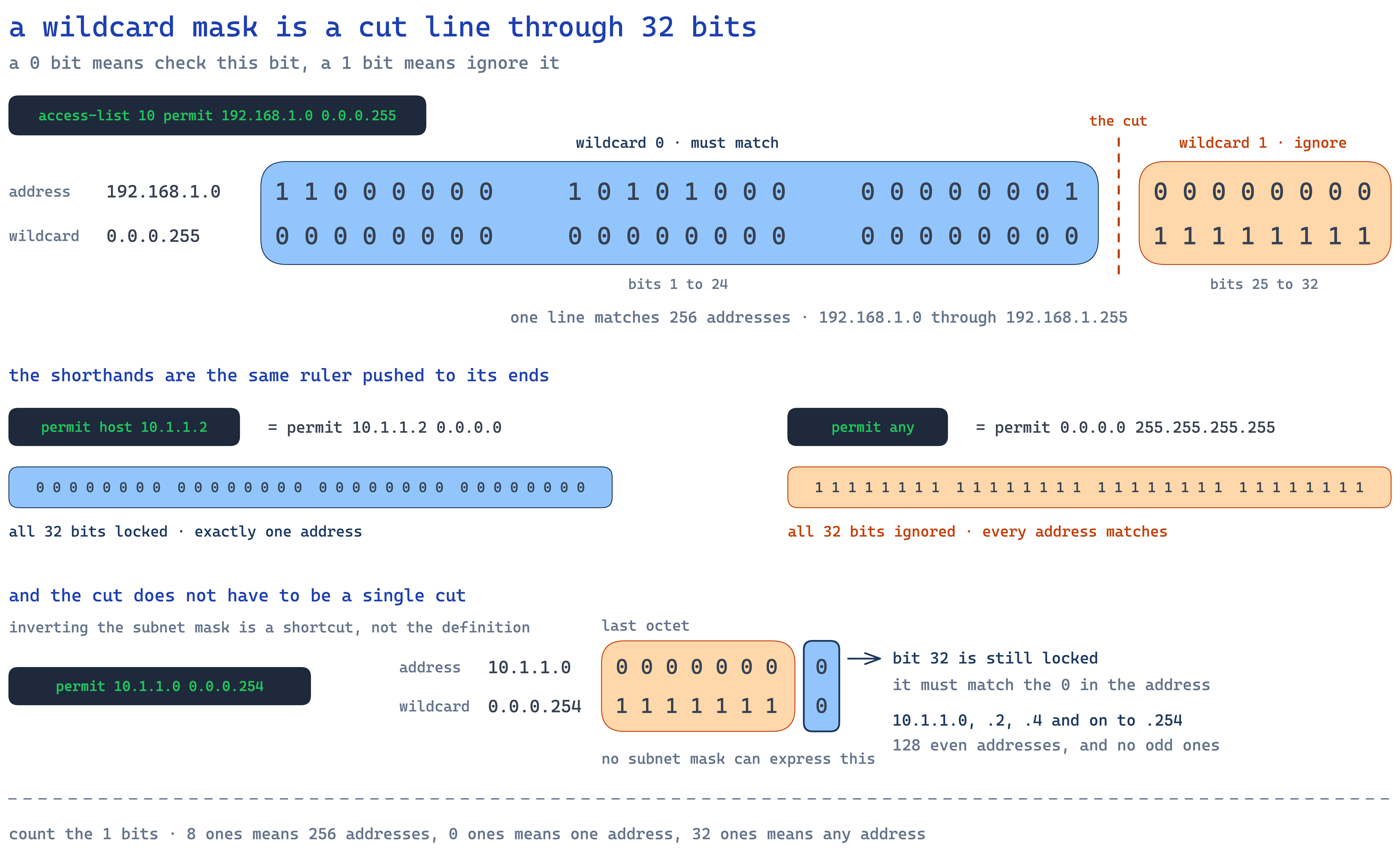
Work a /26 through by hand once and the pattern stops being mysterious. The subnet mask 255.255.255.192 is 11111111.11111111.11111111.11000000 in binary. Twenty six 1 bits, then six 0 bits. Flip every bit and you get 00000000.00000000.00000000.00111111, which is 0.0.0.63 in decimal. Those six 1 bits on the right are the six host bits, so the wildcard covers 64 addresses. Put it against 192.168.10.64 and the router matches 192.168.10.64 through 192.168.10.127, and nothing outside that block.
The same reasoning explains every row of the table further down. A /20 mask of 255.255.240.0 keeps 20 bits and releases 12, so its wildcard 0.0.15.255 covers 4,096 addresses. A /30 keeps 30 and releases 2, so 0.0.0.3 covers the four addresses of a point to point link. A /32 releases nothing, so its wildcard is 0.0.0.0 and exactly one address matches.
This is not a CISNET house rule. Cisco states it the same way in the IP Access List Overview in the IOS security configuration guide: in an access list the mask bits identify which bits of the address the router examines, and the bits it is told to ignore are not considered when a packet is compared against the entry. Every other place IOS takes a wildcard behaves the same way, because it is the same matching engine underneath.
Hold on to the bit definition rather than the subtraction, because the subtraction quietly assumes something that is not always true. It assumes the 1 bits run in one unbroken block. Wildcards are not required to do that, and the section on discontiguous masks below is what happens when they do not.
Where Cisco IOS expects a wildcard mask
There are four places on the CCNA and CCNP blueprints where the wildcard form is the right answer, and one very visible place where it is wrong. The rule that covers all of them: if IOS is matching a range of addresses, it wants a wildcard. If IOS is assigning an address, it wants a subnet mask.
Access lists. Both numbered and named forms take the wildcard after the source address, and extended lists take a second one after the destination. Named lists are the syntax the current CCNA leans on, because you can edit them by sequence number instead of deleting and retyping the whole list.
ip access-list extended CISNET-IN
 permit ip 192.168.1.0 0.0.0.255 any
 deny   ip any any log
OSPF network statements. The statement is not describing a subnet. It is a match pattern that decides which interfaces OSPF activates on, and it needs the parent process line above it or the router rejects it outright.
router ospf 1
 network 192.168.1.0 0.0.0.255 area 0
EIGRP network statements. Same idea, same wildcard, under a router eigrp 100 parent line where 100 is the autonomous system number. EIGRP will also accept a bare classful network with no mask at all, which is why people get away with sloppy statements for years and then trip over the wildcard the first time they need to be precise.
Route-map match clauses. A route-map does not carry the wildcard itself. It points at an access list, and that access list holds the wildcard, which is the detail that makes redistribution filtering confusing the first few times.
ip access-list standard OSPF-NETS
 permit 192.168.1.0 0.0.0.255
route-map REDIST-OSPF permit 10
 match ip address OSPF-NETS
Interface addressing is the exception. An interface takes a subnet mask, as in ip address 192.168.1.1 255.255.255.0. Nothing is being matched there, so there is no wildcard involved. If you want to drill the boundary between the two until it is automatic, the subnetting practice generator and the CCNA practice questions both come back to it.
From the lab: what actually goes wrong
In the Packet Tracer labs I run for the CCNA, the single most common reason an OSPF adjacency never forms is a subnet mask typed into a network statement. The reason it wastes so much time is that nothing looks broken. IOS accepts network 192.168.1.0 255.255.255.0 area 0 without a word of complaint, because 255.255.255.0 is a perfectly legal wildcard. Read as a wildcard it ignores the first three octets entirely and demands that the fourth octet match 0 exactly, so the only interface it would ever enable is one whose address ends in .0. Router interfaces do not have addresses ending in .0. The statement therefore enables OSPF on nothing at all.
The tell is quick if you know where to look. Check the interfaces the process actually claimed before you go anywhere near neighbour states or timers:
R1# show ip ospf interface brief
R1#
An empty list there means the process is running and has no interfaces, which points straight at the network statement. Students who skip that command tend to start checking cabling, hello timers and area numbers instead, and they can lose twenty minutes of a lab to a line the router already told them it accepted.
The second pattern I see every cohort is an access list built with the wildcard for the wrong prefix. Somebody means to permit a /26 and writes 0.0.0.255 because that is the wildcard their fingers know. The list works in the sense that traffic flows, so it passes the quick test, and it quietly permits four times the address space that was intended. Nobody notices until an audit or an outage. This is why I ask students to state the number of addresses a line covers out loud before they apply it: 0.0.0.63 is 64 addresses, 0.0.0.255 is 256, and if the two numbers do not match the design, the line is wrong no matter how well it pings.
The habit that fixes both is the same one: convert once, in binary, and count the host bits. Six 1 bits on the right of a wildcard means 64 addresses, eight means 256. After a few dozen repetitions you stop converting at all and start recognising the numbers, which is what the exam is really testing when it puts a wildcard in a four option question and gives you ninety seconds.
Common masks and their wildcards
Every wildcard below is a block of 0 bits followed by a block of 1 bits, and the count of 1 bits is the count of host bits. That is the whole table in one sentence.
| Prefix | Subnet mask | Wildcard mask | Wildcard in binary | Addresses |
|---|---|---|---|---|
| /8 | 255.0.0.0 | 0.255.255.255 | 00000000.11111111.11111111.11111111 | 16,777,216 |
| /16 | 255.255.0.0 | 0.0.255.255 | 00000000.00000000.11111111.11111111 | 65,536 |
| /20 | 255.255.240.0 | 0.0.15.255 | 00000000.00000000.00001111.11111111 | 4,096 |
| /22 | 255.255.252.0 | 0.0.3.255 | 00000000.00000000.00000011.11111111 | 1,024 |
| /24 | 255.255.255.0 | 0.0.0.255 | 00000000.00000000.00000000.11111111 | 256 |
| /25 | 255.255.255.128 | 0.0.0.127 | 00000000.00000000.00000000.01111111 | 128 |
| /26 | 255.255.255.192 | 0.0.0.63 | 00000000.00000000.00000000.00111111 | 64 |
| /27 | 255.255.255.224 | 0.0.0.31 | 00000000.00000000.00000000.00011111 | 32 |
| /28 | 255.255.255.240 | 0.0.0.15 | 00000000.00000000.00000000.00001111 | 16 |
| /29 | 255.255.255.248 | 0.0.0.7 | 00000000.00000000.00000000.00000111 | 8 |
| /30 | 255.255.255.252 | 0.0.0.3 | 00000000.00000000.00000000.00000011 | 4 |
| /31 | 255.255.255.254 | 0.0.0.1 | 00000000.00000000.00000000.00000001 | 2 |
| /32 | 255.255.255.255 | 0.0.0.0 | 00000000.00000000.00000000.00000000 | 1 |
Discontiguous wildcard masks
A subnet mask has to be contiguous. Its 1 bits run from the left in one unbroken block, which is why every mask is one of the 33 values from /0 to /32. A wildcard mask is under no such obligation, and that is the one real difference between the two.
Take 0.0.0.254. The last octet is 11111110, so the router ignores seven of the eight bits and insists only that the final bit matches. Against 10.1.1.0 that permits every even numbered address in the subnet, 128 of them, and no odd ones. There is no prefix length that describes that set, so the calculator above reports no equivalent prefix rather than inventing one.
The classic production use is one octet up. A source of 10.1.0.0 with a wildcard of 0.0.254.255 matches every subnet whose third octet is even, in one line instead of dozens. Addressing plans that put user VLANs on even subnets and infrastructure on odd ones can be filtered with a single entry, and that is exactly why the feature exists.
The warning that comes with it: a discontiguous wildcard is legal in an access list and in a route-map match clause, and it is not legal anywhere a subnet mask is expected. It is also the hardest kind of line for the next engineer to read. On the exam, recognise it and move on. In production, write a comment beside it.
Frequently Asked Questions
What is a wildcard mask?
A wildcard mask is the bitwise inverse of a subnet mask. Where a subnet mask uses 1 bits to mean 'this part must match', a wildcard mask uses 0 bits to mean 'must match' and 1 bits to mean 'ignore this'. A /24 subnet mask of 255.255.255.0 becomes a wildcard mask of 0.0.0.255. Cisco IOS uses wildcard masks in access lists and in OSPF and EIGRP network statements.
How do I convert a subnet mask to a wildcard mask?
Subtract each octet of the subnet mask from 255. A mask of 255.255.255.0 gives 255-255, 255-255, 255-255, 255-0, which is 0.0.0.255. A mask of 255.255.240.0 gives 0.0.15.255. The arithmetic is the same in both directions, so subtracting a wildcard from 255 returns the subnet mask.
What is the wildcard mask for 255.255.240.0?
0.0.15.255. Subtract each octet from 255: 255-255 is 0, 255-255 is 0, 255-240 is 15, 255-0 is 255. That mask is a /20, so the wildcard ignores the low 12 bits and covers 4,096 addresses. In a configuration it looks like 'network 172.16.0.0 0.0.15.255 area 0'.
Why does OSPF use a wildcard mask instead of a subnet mask?
OSPF inherited the syntax from Cisco access lists, which were already matching ranges of addresses bit by bit. The network statement is not defining a subnet, it is selecting which interfaces to enable OSPF on, so it needs a match pattern rather than a mask. EIGRP uses the same syntax. This is why the line network 192.168.1.0 0.0.0.255 area 0 is correct and using 255.255.255.0 there is a common CCNA mistake. Our guide to OSPF network statements and areas walks through what the router does with that line once it accepts it.
What wildcard mask matches a single host?
0.0.0.0, which is the inverse of a /32. Every bit must match, so it selects exactly one address. In an access list you can write 'host 10.1.1.1' as shorthand for '10.1.1.1 0.0.0.0'. The opposite extreme, 255.255.255.255, matches every address and has the shorthand 'any'. The same 0.0.0.0 works in an OSPF network statement to enable one interface by its exact address.
What is a discontiguous wildcard mask?
A wildcard mask whose 1 bits are not all on the right, for example 0.0.0.254. It is legal in an access list, where it matches a repeating pattern of addresses such as every even host, but it does not correspond to any subnet mask or prefix length. Subnet masks must be contiguous; wildcard masks do not have to be. This calculator reports the pattern and tells you no equivalent prefix exists, and how ACLs read wildcard bits covers why the hardware is happy to match a pattern no subnet could describe.
Do I use a wildcard mask on an interface IP address?
No. Interface addressing uses the subnet mask, as in ip address 192.168.1.1 255.255.255.0. The wildcard form appears only where IOS is matching a range: access lists, OSPF and EIGRP network statements, and route-map match clauses. Mixing the two up is one of the most common configuration errors on the CCNA lab, and the fastest way to stop making it is to read a handful of real access lists, which is what standard versus extended ACLs is built around.
How do I enable OSPF on just one interface?
Use the exact interface address with a wildcard of 0.0.0.0, as in 'network 10.1.1.1 0.0.0.0 area 0'. Every bit has to match, so the statement selects that one interface and nothing else. It is the safest form to use on a router with many interfaces because it removes any doubt about which links OSPF will come up on.
Still guessing at wildcard masks?
Wildcard masks come up in every ACL and every OSPF and EIGRP configuration on the CCNA. Our live CCNA 200-301 course drills them in Packet Tracer until the conversion is automatic, with Mani Poopal taking the labs.
Ready to Advance Your IT Career?
Get in touch to find the right certification path for your goals.
Get in Touch


