
Symmetric vs Asymmetric Encryption: How HTTPS Uses Both

Symmetric encryption uses one shared key to encrypt and decrypt, which makes it fast enough for bulk data; AES is the standard. Asymmetric encryption uses a public and private key pair, which solves key exchange and enables digital signatures but runs far slower; RSA and ECC are the common algorithms. HTTPS uses both: asymmetric cryptography during the TLS handshake to authenticate the server and agree a session key, then symmetric encryption for everything after.
Every time you load a page over HTTPS, those two kinds of encryption work together in the first few milliseconds. Understanding how they cooperate is one of the highest-value concepts on the CompTIA Security+ exam, and it is the foundation for everything from VPNs to digital signatures on the CISSP.
At CISNET, our instructors teach encryption the way it actually behaves on the wire, not as a list of algorithm names to memorize. Once you understand the single problem each type solves, the exam questions about AES, RSA, key exchange, and TLS stop being trick questions and start being obvious.
The Two Kinds of Encryption
There are two families of encryption, and they exist because they solve opposite problems.
Symmetric encryption uses one shared secret key. The same key both encrypts and decrypts the data, so the sender and receiver must both hold it. It is extremely fast and is what actually protects the bulk of your data, but it has one glaring weakness: both parties need the same key, and getting that key to the other side without an eavesdropper stealing it is genuinely hard.
Asymmetric encryption uses a pair of mathematically linked keys: a public key and a private key. What one key locks, only the other can unlock. You can hand your public key to the entire world; anything encrypted with it can only be decrypted by your matching private key, which never leaves your possession. This elegantly solves the key-distribution problem, but the math is far slower than symmetric encryption, so it is impractical for encrypting large amounts of data.
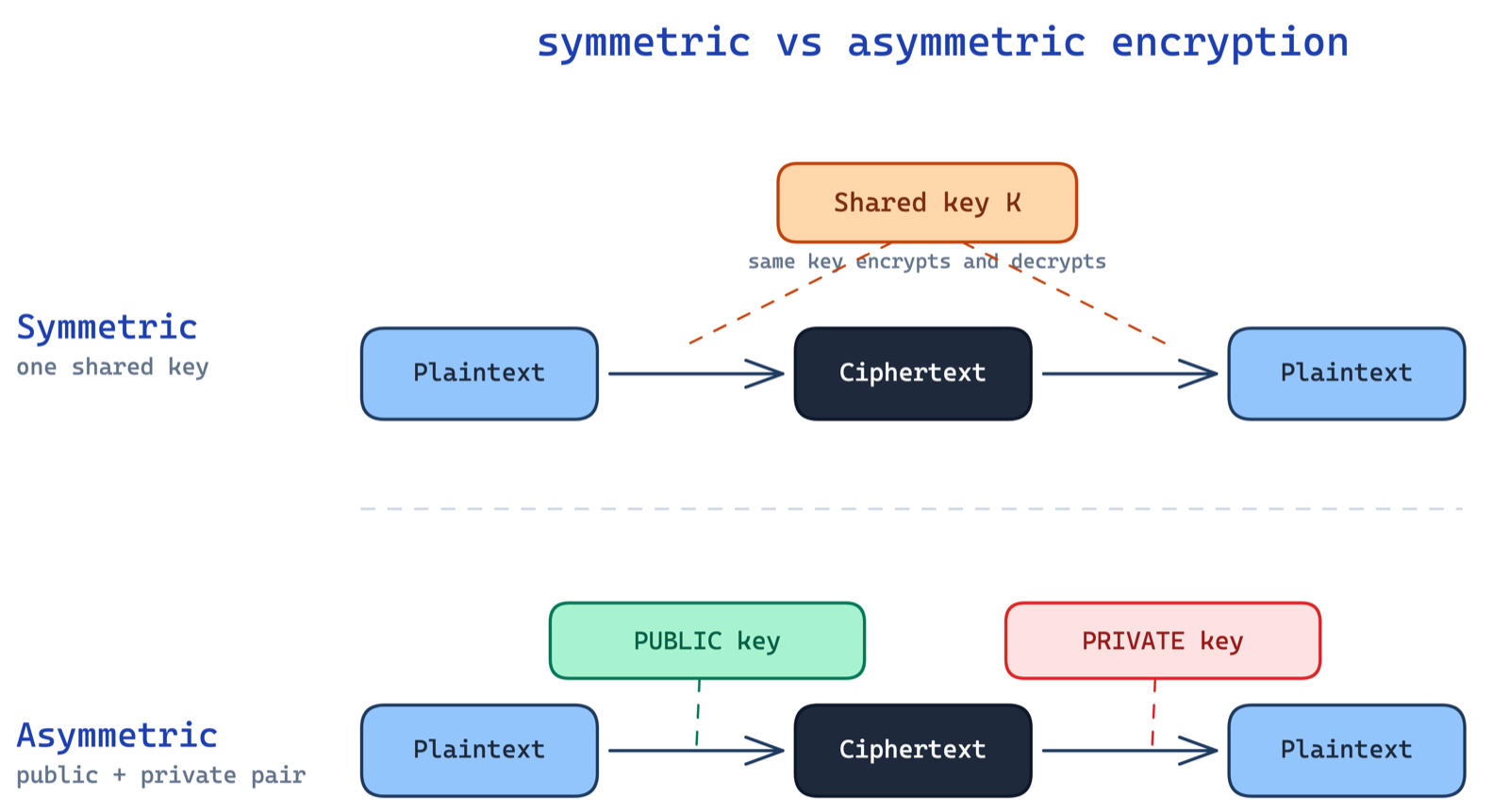
Read the diagram as two answers to one question: how do the sender and receiver agree on how to unlock the data? Symmetric says "share the same secret." Asymmetric says "publish a lock anyone can use, keep the only key that opens it."
How Symmetric Encryption Works
In symmetric encryption, plaintext goes in, the algorithm scrambles it with the shared key, and ciphertext comes out. The receiver runs the same algorithm in reverse with the same key to recover the plaintext. Because it is just fast bit manipulation, it can encrypt gigabytes per second.
The algorithm to know cold for Security+ is AES (Advanced Encryption Standard), typically AES-128 or AES-256, where the number is the key length in bits. AES is the modern default for data at rest and in transit, standardized by NIST in FIPS 197. The older DES and 3DES appear on the exam mainly as the deprecated algorithms you should recognize and avoid.
The catch is key management. If two parties have never met, how does the first key reach the other side safely? Send it over the same untrusted network and an attacker can grab it. That single question is why asymmetric encryption had to be invented.
How Asymmetric Encryption Works
Asymmetric encryption breaks the key into a pair. Your public key is meant to be shared freely; your private key is a secret you never disclose. The two are linked so that data encrypted with the public key can only be decrypted with the private key, and vice versa.
That "vice versa" is powerful. Encrypting with someone's public key gives you confidentiality: only they can read it. Encrypting a hash with your own private key gives you a digital signature: anyone can verify with your public key that the message really came from you and was not altered. The common algorithms are RSA and the more efficient ECC (elliptic curve cryptography), plus Diffie-Hellman for key exchange.
The downside is speed. Asymmetric operations are hundreds to thousands of times slower than symmetric ones, so you would never use them to encrypt a large file or a video stream directly. Instead, you use asymmetric encryption for one small, critical job: safely delivering a symmetric key.
How HTTPS Uses Both (the TLS Handshake)
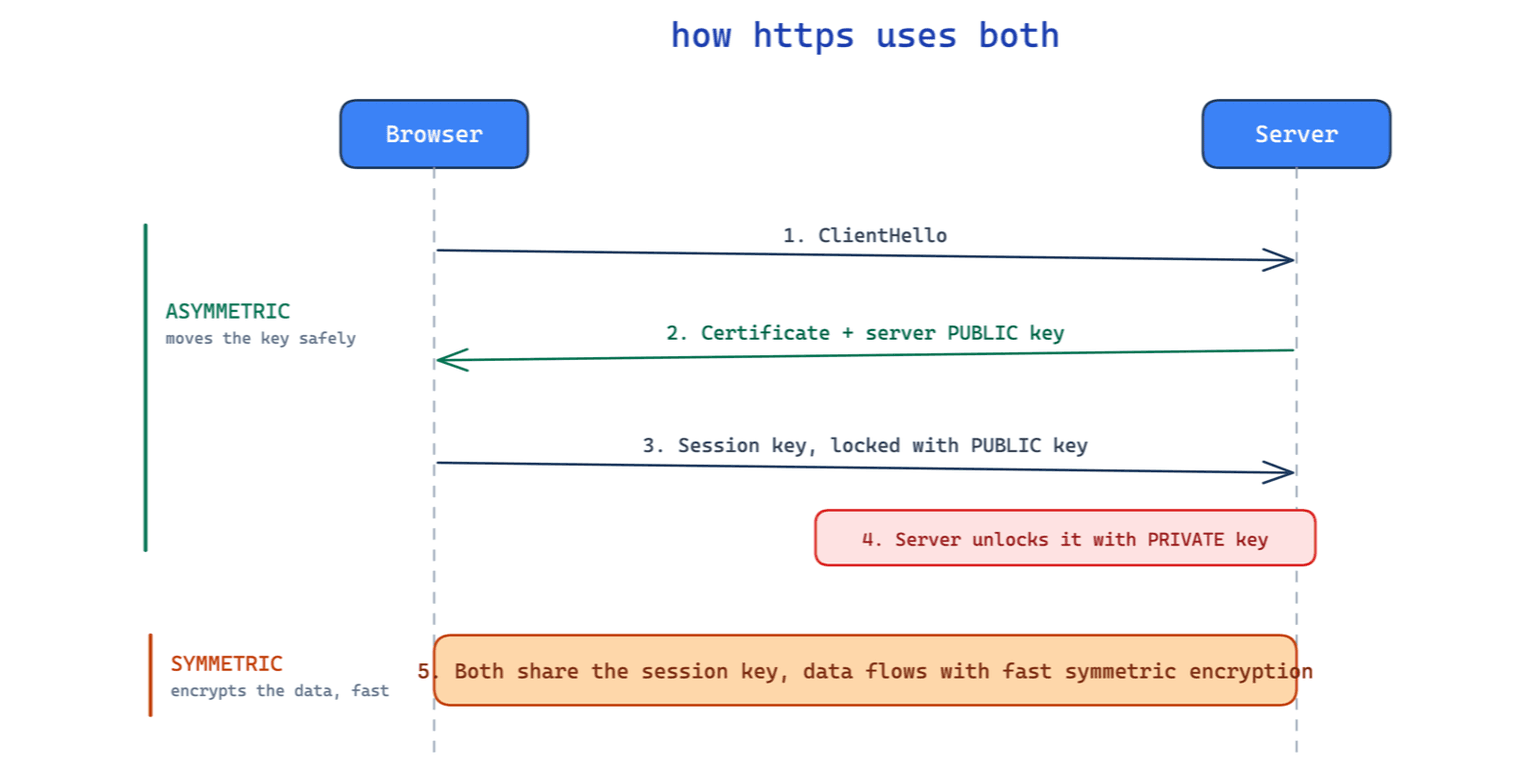
This is where it all comes together, and it is a favorite exam scenario. A secure web connection does not choose symmetric or asymmetric; it uses both, each for what it is good at.
When your browser connects to an HTTPS site, a simplified TLS handshake runs:
- The browser requests a secure connection, and the server sends its certificate, which contains the server's public key.
- The browser generates a fresh symmetric session key for this connection.
- The browser encrypts that session key with the server's public key and sends it over. Because only the server's private key can decrypt it, an eavesdropper who captures the traffic learns nothing.
- The server decrypts the session key with its private key. Now both sides share the same symmetric key, and no one else does.
- For the rest of the session, all data is encrypted with fast symmetric encryption using that session key.
The diagram at the top of this article walks through that exchange step by step. The takeaway is the pattern: asymmetric encryption is used briefly to set up trust and move a key; symmetric encryption then does the heavy lifting. You get the key-distribution safety of asymmetric and the speed of symmetric in one connection. Modern TLS 1.3 formalizes this exact flow in RFC 8446, the IETF standard that governs how the handshake works.
The students who ace the crypto questions are the ones who stop memorizing algorithm names and start asking one question of every scenario: what problem is this solving, key distribution or bulk speed? Answer that and the TLS handshake explains itself.
Hashing Is Not Encryption
Security+ deliberately tests whether you confuse hashing with encryption, so keep them separate. Encryption is reversible: with the right key you get the original data back. Hashing is a one-way function; you cannot reverse a hash to recover the input. Hashes like SHA-256, defined in NIST FIPS 180-4, are used to verify integrity, not to hide data. When a site stores your password, it stores a salted hash, not encrypted text, precisely because it should never be able to reverse it.
What to Remember for the Security+ Exam
| Symmetric | Asymmetric | |
|---|---|---|
| Keys | One shared secret key | Public + private key pair |
| Speed | Fast, handles bulk data | Slow, small payloads only |
| Solves | Fast confidentiality | Key distribution + signatures |
| Algorithms | AES, DES, 3DES | RSA, ECC, Diffie-Hellman |
| Used in TLS for | Encrypting the actual data | Exchanging the session key |
If you can rebuild that table and explain the TLS handshake in your own words, you have covered a meaningful chunk of the cryptography objectives in both Security+ and the broader CISSP body of knowledge. Pair it with our Security+ study guide to see how cryptography fits the full SY0-701 blueprint.
Sources
The primary references this guide relies on:
- FIPS 197, the Advanced Encryption Standard, and FIPS 180-4, the Secure Hash Standard.
- RFC 8446, The Transport Layer Security (TLS) Protocol Version 1.3.
Frequently Asked Questions
Is symmetric or asymmetric encryption more secure?
Neither is inherently more secure; they protect against different problems. Symmetric encryption with AES-256 is extremely strong and fast, but it cannot solve the problem of getting the key to the other party safely. Asymmetric encryption solves key distribution but is too slow for bulk data. Modern systems like TLS combine both to get the strengths of each.
Why does HTTPS use both symmetric and asymmetric encryption?
Because each is good at something the other is not. Asymmetric encryption safely delivers a secret key over an untrusted network without any prior shared secret, but it is slow. Symmetric encryption is fast enough to protect a whole session but cannot safely distribute its own key. HTTPS uses asymmetric encryption once to exchange a symmetric session key, then uses that symmetric key for speed.
What is the difference between a public key and a private key?
They are a mathematically linked pair. The public key can be shared with anyone and is used to encrypt data or verify a signature. The private key is kept secret and is used to decrypt data encrypted with the public key or to create a signature. Data locked with one can only be unlocked with the other.
Is hashing the same as encryption?
No. Encryption is reversible with the correct key, so the original data can be recovered. Hashing is one-way: a hash such as SHA-256 cannot be reversed to reveal the input. Hashing verifies integrity and safely stores passwords; encryption protects confidentiality.
Which encryption algorithms should I know for Security+?
For symmetric encryption, know AES as the modern standard and recognize DES and 3DES as deprecated. For asymmetric encryption, know RSA and ECC, plus Diffie-Hellman for key exchange. For hashing, know SHA-256 and understand why MD5 and SHA-1 are no longer considered safe.
CISNET's live, instructor-led Security+ training covers cryptography, PKI, and the full SY0-701 blueprint with hands-on labs, so concepts like the TLS handshake become something you can trace instead of memorize.


