
TCP vs UDP: Key Differences, Ports and Examples

TCP and UDP are the two transport layer protocols that carry application data across IP networks. TCP is connection oriented and reliable: it sets up a session with a three-way handshake, acknowledges every segment and re-sends anything lost. UDP is connectionless: it sends datagrams with no handshake and no delivery guarantee, which makes it faster and lighter.
Every CCNA candidate hits the same wall early: TCP and UDP both live at the transport layer, both carry your application data, and the exam expects you to know exactly when each one is used and why. Get this wrong and you lose easy marks; understand it and a whole cluster of 200-301 topics (ports, the three-way handshake, DNS, DHCP, VoIP) suddenly clicks.
At CISNET our instructors teach transport-layer concepts the same way they show up in real networks and on the exam: not as definitions to memorize, but as a single trade-off you can reason from. TCP trades speed for reliability. UDP trades reliability for speed. Once you internalize that, you can answer almost any TCP-versus-UDP question without guessing.
TCP vs UDP: The One Trade-Off That Explains Everything
Both protocols sit at Layer 4 of the OSI model and hand your data to IP for delivery. The difference is what they promise about that delivery.
TCP (Transmission Control Protocol) is connection-oriented, defined by the IETF in RFC 9293. Before any data moves, the two hosts complete a handshake, agree on sequence numbers, and set up state on both ends. Every segment is numbered, acknowledged, and re-sent if it goes missing, and the data is reassembled in the exact order it was sent. That machinery is why a web page or a file download arrives complete and correct, and it is also why TCP carries more overhead.
UDP (User Datagram Protocol) is connectionless, specified in RFC 768, one of the oldest protocols still in daily use. There is no handshake, no acknowledgements, no sequence tracking, and no automatic retransmission. UDP just wraps your data in a small header and fires it at the destination. If a datagram is lost, UDP does not notice or care. That sounds reckless until you realize it is exactly what a live voice call or a game needs: a packet that arrives late is worse than useless, so there is no point re-sending it.
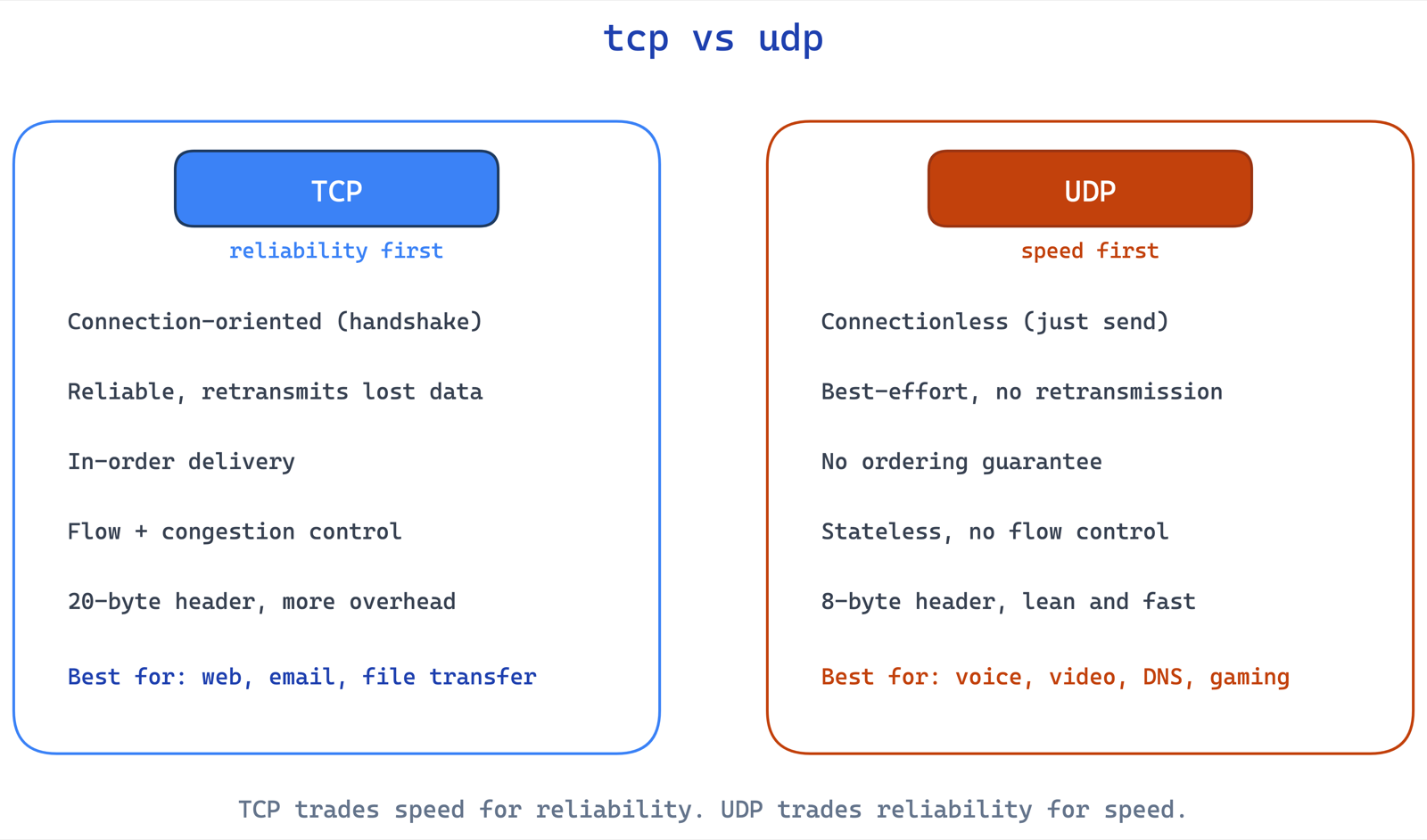
| Feature | TCP | UDP |
|---|---|---|
| Connection | Connection-oriented: a three-way handshake first | Connectionless: no setup |
| Delivery | Guaranteed: acknowledgements and retransmission | Best effort: a lost datagram stays lost |
| Ordering | Reassembled in order by sequence number | No ordering |
| Flow and congestion control | Yes, with a sliding window | None |
| Header size | 20 bytes minimum | 8 bytes |
| Typical uses | Web, email, file transfer, SSH | DNS queries, DHCP, VoIP, video, gaming |
The whole comparison collapses into one question the exam loves to ask in disguise: does this application need every byte to arrive in order, or does it need data to arrive fast even if a little is lost?
How the TCP Three-Way Handshake Works
Because TCP is connection-oriented, it cannot send data until both hosts agree to talk. That agreement is the three-way handshake, and it is one of the most tested mechanics on the CCNA.
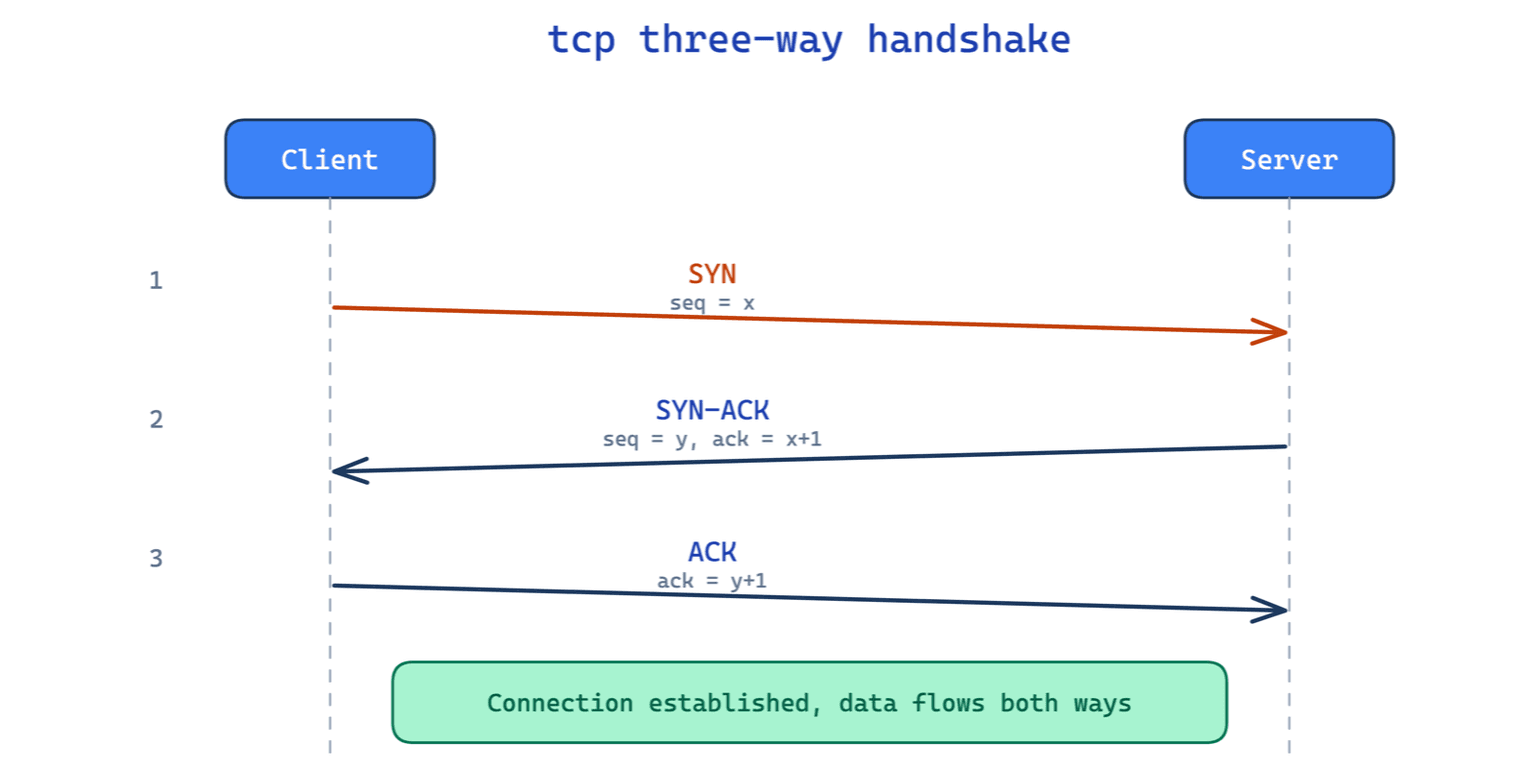
It happens in three steps, using flags in the TCP header:
- SYN - the client picks an initial sequence number and sends a segment with the SYN (synchronize) flag set. This says "I want to open a connection, and my sequence numbers start here."
- SYN-ACK - the server replies with both the SYN and ACK flags set. It acknowledges the client's sequence number and sends its own initial sequence number.
- ACK - the client acknowledges the server's sequence number. The connection is now established, and data can flow in both directions.
The sequence at the top of this article shows that exchange step by step. Two details examiners like to probe. First, the handshake is why TCP is called connection-oriented: real state exists on both machines before byte one of application data. Second, tearing a connection down uses a similar exchange with the FIN flag. UDP has none of this, which is precisely why it is faster to get started.
Students lose marks on this by memorizing "TCP reliable, UDP fast" and stopping there. In the lab I have them watch a Packet Tracer capture: once you see the SYN, SYN-ACK, ACK actually happen and then watch a UDP DNS query fire with no setup at all, you never confuse the two again.
What Actually Makes TCP Reliable
"Reliable" is not a marketing word here; it is a set of concrete mechanisms, and the CCNA expects you to name them:
- Sequence numbers label every byte so the receiver can reassemble segments in order, even if they arrive out of order.
- Acknowledgements (ACKs) tell the sender which data was received. Unacknowledged data is retransmitted after a timeout.
- Retransmission re-sends lost segments automatically, so the application never sees the gap.
- Flow control uses a sliding window so a fast sender does not overwhelm a slow receiver.
- Congestion control backs off the send rate when the network is dropping packets.
UDP provides none of these. If your application needs any of them, it either uses TCP or has to rebuild that logic itself (which is what protocols like QUIC do on top of UDP).
Why UDP Is Faster and Leaner
UDP's advantage is everything it leaves out. There is no handshake, so there is no round-trip delay before data can flow. There is no per-connection state, so a server can handle huge numbers of clients cheaply. And the UDP header is only 8 bytes, compared to TCP's 20 bytes minimum, so there is less overhead on every single packet.
That efficiency is the entire point for real-time and high-volume traffic. In a voice call, a 200-millisecond retransmission would arrive after the moment it was meant for, creating a stutter instead of fixing anything. Dropping the lost audio and moving on sounds better. The same logic applies to live video, online games, and DNS lookups, where sending one more small query is cheaper than maintaining a connection.
When to Use TCP vs UDP (and the Ports to Memorize)
For the exam and for real troubleshooting, you should be able to place common services on the right protocol instantly.
| Use TCP when you need reliability | Use UDP when you need speed |
|---|---|
| HTTP / HTTPS (web) - ports 80 / 443 | DNS queries - port 53 |
| SMTP / IMAP / POP3 (email) | DHCP - ports 67 / 68 |
| FTP / SFTP (file transfer) - 20/21 | VoIP and video (RTP) |
| SSH (remote admin) - port 22 | Online gaming and live streaming |
| Any transfer where completeness matters | SNMP monitoring - port 161 |
Two nuances worth knowing. DNS usually uses UDP for fast lookups but switches to TCP for large responses and zone transfers, so "DNS is UDP" is only mostly true. And HTTP/3 runs over QUIC, which is built on UDP but adds its own reliability, showing that the TCP-versus-UDP line is about trade-offs, not a permanent law.
If you can build the ports table from memory and explain why each service sits where it does, you have covered a meaningful slice of the CCNA 200-301 blueprint. Drill it with our free CCNA practice exam and the subnetting guide to round out the network-fundamentals domain.
Sources and last verified
Verified October 21, 2026 against:
- RFC 9293, Transmission Control Protocol.
- RFC 768, User Datagram Protocol.
- Cisco's 200-301 v1.1 exam topics, topic 1.5, "Compare TCP to UDP".
Frequently Asked Questions
What is the main difference between TCP and UDP?
TCP is connection oriented: it opens a session with a three-way handshake, numbers and acknowledges every segment, and re-sends anything lost, so data arrives complete and in order. UDP is connectionless: it sends datagrams with no handshake, no acknowledgements and no retransmission, which is faster and lighter but guarantees nothing.
What are the advantages of TCP over UDP?
Guaranteed, ordered delivery. TCP acknowledges data, re-sends lost segments, puts them back in order, and uses flow control and congestion control so it never overwhelms a slow receiver or a busy network. That is why web pages, email and file transfers use it. The price is more overhead and latency than UDP.
Is TCP vs UDP still on the CCNA exam?
On the current exam, v1.1, yes: topic 1.5 is "Compare TCP to UDP". Cisco's v2.0 blueprint, live from February 3, 2027, no longer lists it as a topic of its own, but port numbers and transport behaviour still sit underneath its troubleshooting questions.
Is TCP or UDP better?
Neither is better in general; they are built for different jobs. TCP is better when every byte must arrive correctly and in order, such as web pages, email, and file transfers. UDP is better when speed matters more than perfect delivery, such as voice calls, live video, gaming, and DNS lookups. The right question is always what the application needs.
Why does the TCP three-way handshake have three steps?
Three steps are the minimum needed for both hosts to agree on starting sequence numbers and confirm each other is reachable. The client's SYN and the server's SYN each need to be acknowledged; the server combines its acknowledgement and its own SYN into one SYN-ACK, so the whole exchange takes three messages instead of four.
Is DNS TCP or UDP?
Both. DNS uses UDP on port 53 for normal queries because they are small and fast, but it falls back to TCP for responses too large for a single UDP datagram and for zone transfers between servers. The CCNA expects you to know it is primarily UDP with a TCP fallback.
Does UDP have any error checking?
UDP has a checksum that lets the receiver detect a corrupted datagram, but that is all. If the checksum fails, the datagram is simply discarded; UDP does not request a retransmission or notify the application. It detects some errors but does not correct them.
How is TCP reliability actually achieved?
Through sequence numbers, acknowledgements, retransmission of lost segments, in-order reassembly, flow control with a sliding window, and congestion control. Together these guarantee that the receiving application gets a complete, correctly ordered stream even when the network loses or reorders packets.
Transport-layer concepts like these are exactly what CISNET's live, instructor-led CCNA training drills with hands-on labs in Packet Tracer, so you can see the handshake and the retransmissions happen instead of just reading about them.


