
CompTIA A+ 220-1201 and 220-1202: What Changed

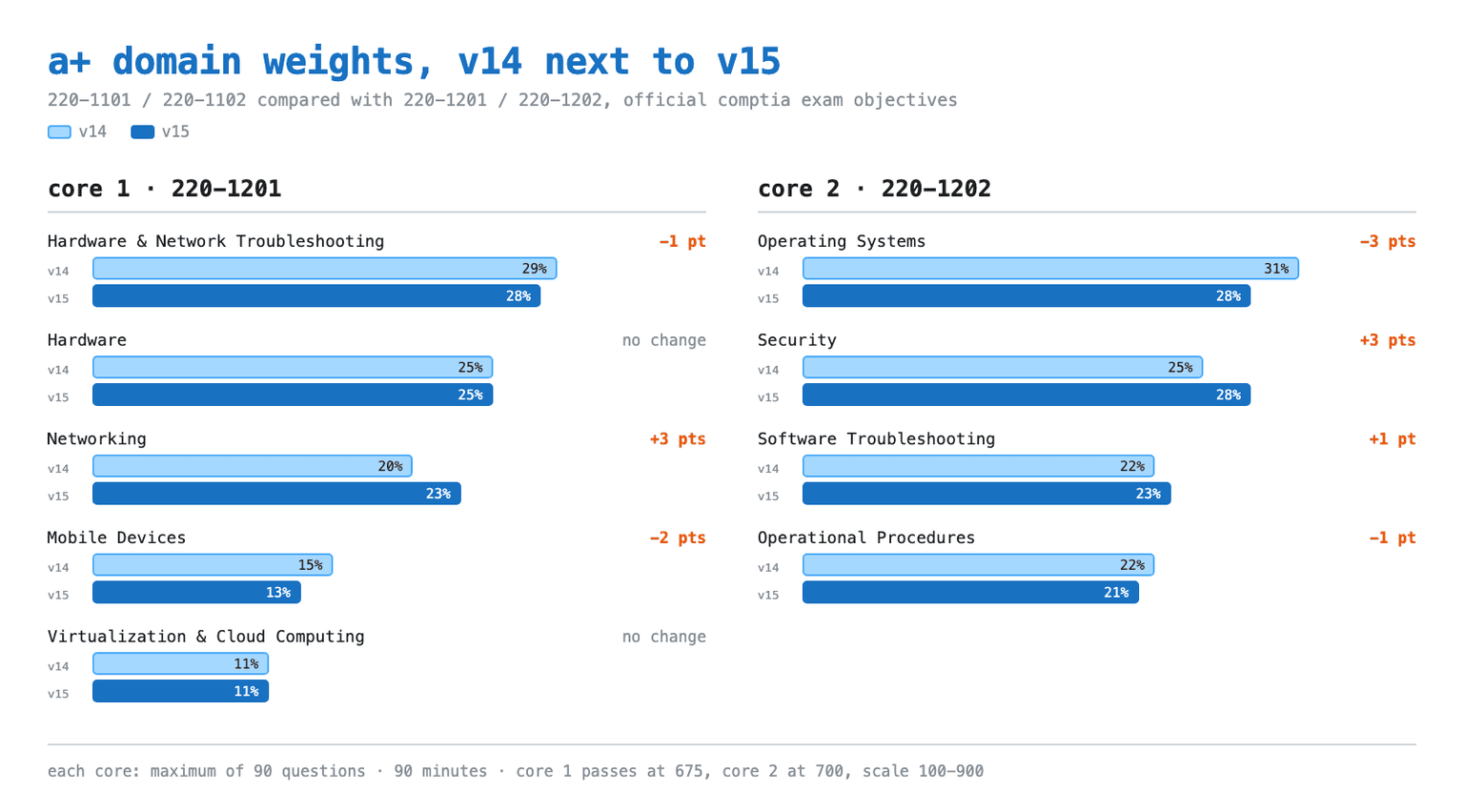
Both CompTIA A+ exams you can book in 2026 are V15: Core 1 is 220-1201, Core 2 is 220-1202, and you need to pass both to be certified. Core 1 is 28% Hardware and Network Troubleshooting, 25% Hardware, 23% Networking, 13% Mobile Devices and 11% Virtualization and Cloud Computing. Core 2 is 28% Operating Systems, 28% Security, 23% Software Troubleshooting and 21% Operational Procedures. Each exam is a maximum of 90 questions in 90 minutes, mixing multiple choice with performance-based questions.
That is the map. The rest of this page exists because much of the study material still sold teaches a different exam. V15 went live March 25, 2025, and the old pair, 220-1101 and 220-1102, retired in English on September 25, 2025. Anything written before autumn 2025 drills deleted objectives, tests a methodology CompTIA removed from the exam, and points your hours at the wrong domains.
Verified September 22, 2026 against CompTIA's 220-1201 and 220-1202 Exam Objectives, Version 2.0, read against the retired V14 documents.
What is tested on A+ V15, by domain
| Exam | Domain | Weight |
|---|---|---|
| Core 1 (220-1201) | Hardware and Network Troubleshooting | 28% |
| Core 1 (220-1201) | Hardware | 25% |
| Core 1 (220-1201) | Networking | 23% |
| Core 1 (220-1201) | Mobile Devices | 13% |
| Core 1 (220-1201) | Virtualization and Cloud Computing | 11% |
| Core 2 (220-1202) | Operating Systems | 28% |
| Core 2 (220-1202) | Security | 28% |
| Core 2 (220-1202) | Software Troubleshooting | 23% |
| Core 2 (220-1202) | Operational Procedures | 21% |
Two readings matter. In Core 1, Networking is now ten points bigger than Mobile Devices. In Core 2, Security has caught Operating Systems, and together they are 56% of the exam. Core 2 has four domains, not five: virtualization and cloud sits in Core 1 only.
The rest of the exam facts:
- Both exams come from the same version. A V14 Core 1 pass cannot be paired with a V15 Core 2 pass.
- The passing scores differ: 675 for Core 1, 700 for Core 2, on a scale of 100 to 900, not zero to 900.
- Vouchers are priced per exam at $274 USD North American list, so both cores is $548 USD at list.
- V15 is not bigger. Both versions carry 63 objectives: Core 1 fell from 28 to 27, Core 2 rose from 35 to 36.
- Experience is recommended, not required: 12 months in an IT support specialist role.
Full detail sits on our CompTIA A+ certification page.
How V15 differs from V14, and why old material misleads
| Domain | V14 | V15 |
|---|---|---|
| Core 1: Mobile Devices | 15% | 13% |
| Core 1: Networking | 20% | 23% |
| Core 1: Hardware | 25% | 25% |
| Core 1: Virtualization and Cloud Computing | 11% | 11% |
| Core 1: Hardware and Network Troubleshooting | 29% | 28% |
| Core 2: Operating Systems | 31% | 28% |
| Core 2: Security | 25% | 28% |
| Core 2: Software Troubleshooting | 22% | 23% |
| Core 2: Operational Procedures | 22% | 21% |
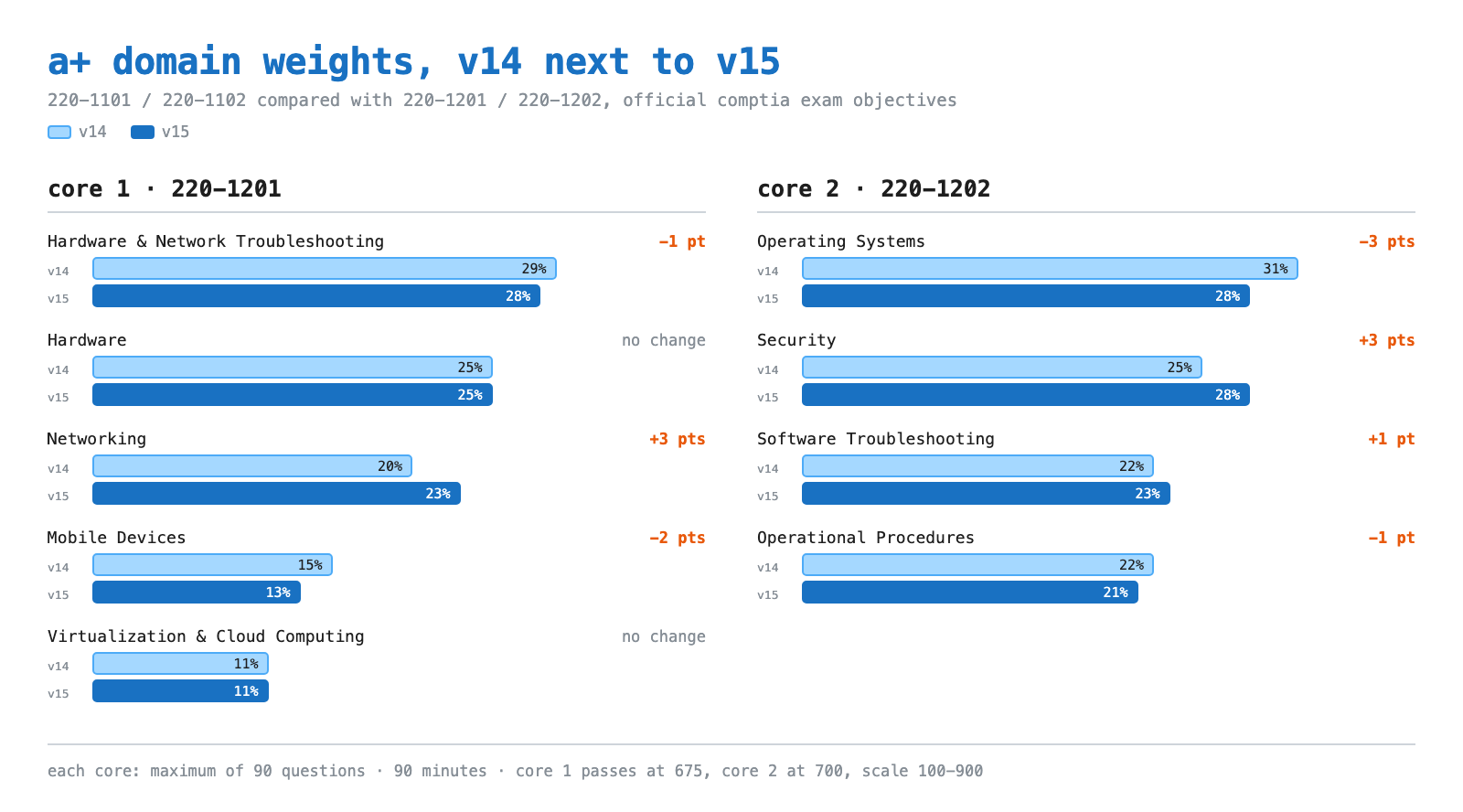
A two or three point shift looks like a rounding error. It is not: most of that movement is relocation, not addition.
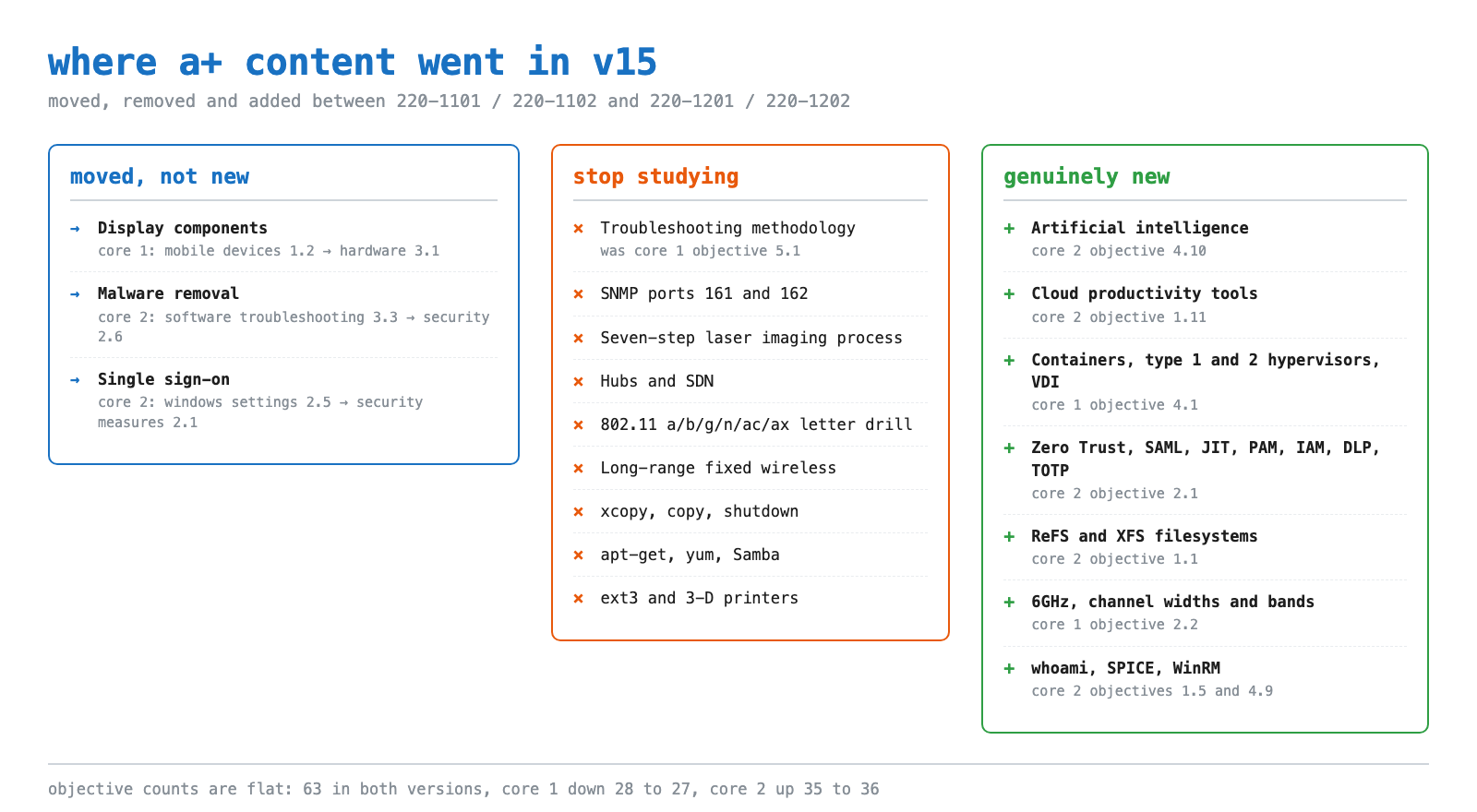
Display components are the clearest case. In V14 they sat in Mobile Devices as Core 1 objective 1.2. In V15 they are objective 3.1 under Hardware, expanded with Mini-LED, pixel density, refresh rates and color gamut. That one move is most of why Mobile Devices fell to 13%: the exam did not lose mobile content, it refiled it.
Malware removal did the same in Core 2, moving from objective 3.3 under Software Troubleshooting to objective 2.6 under Security. That is why Security gained three points while Software Troubleshooting still rose one, despite losing a whole objective.
What V15 genuinely added
- Artificial intelligence, Core 2 objective 4.10. The first AI objective in A+ history: application integration, acceptable-use and plagiarism policy, limitations including bias and hallucinations, and private versus public tools.
- Cloud-based productivity tools, Core 2 objective 1.11. Email systems, storage sync and folder settings, collaboration tools, identity synchronization and licensing assignment.
- Virtualization gets real, Core 1 objective 4.1. V14 covered the purpose of virtual machines plus resource and security requirements. V15 adds containers, Type 1 and Type 2 hypervisors and virtual desktop infrastructure, and the cloud objective gains multitenancy plus ingress and egress.
- Modern identity, Core 2 objective 2.1. Zero Trust, SAML, just-in-time access, privileged access management, data loss prevention and TOTP arrive at once. Single sign-on only relocates here, from V14's objective 2.5.
The troubleshooting methodology is no longer tested
Most video courses and practice banks still drill the six steps as an exam item, which is how experienced candidates lose easy marks. In V14 it was Core 1 objective 5.1. In V15 it is printed in the objectives and explicitly excluded.
While this methodology is practical, the decision was made to not include it in the exam. ... Therefore, the troubleshooting methodology section appears here as part of this "competency standard" but does not constitute a formal objective or part of the A+ certification exam. CompTIA, 220-1201 Exam Objectives, Version 2.0
Internalize them anyway: they are still how the job works and how interviews are scored. Troubleshooting is still the largest Core 1 domain at 28%, because questions now test symptom diagnosis in a scenario rather than recital of the process.
Stop studying these
All of it was testable in V14 and is absent from V15.
- SNMP on ports 161 and 162, gone from the Core 1 port list.
- The seven stage laser imaging process and the drum, fuser and transfer belt drill with it. V15 reduces laser printers to maintenance: replace toner, apply maintenance kit, calibrate, clean.
- 3-D printers, filament, resin and print bed. The V15 lab appendix still suggests one, but that is not an objective.
- Hubs and software-defined networking.
- The 802.11 a/b/g/n/ac/ax letter drill, now collapsed to one "802.11 standards" bullet.
- Long-range fixed wireless and its licensed, unlicensed, power and regulatory sub-items.
- The Windows commands
xcopy,copyandshutdown, plus drive navigation inputs. V15 addswhoami. apt-getandyum, replaced byaptanddnf. Samba went with them.- Microsoft Remote Assistance, replaced in Core 2 objective 4.9 by SPICE and Windows Remote Management.
One correction while you edit notes: V15 did not add WPA3 and did not remove WEP. Both versions list WPA2, WPA3, TKIP and AES, and WEP appears only in each acronym appendix.
Linux is the sleeper difficulty spike
Core 2 objective 1.9 is where V15 got harder. V14 gave a flat command list; V15 categorizes it: file management with ls, pwd, mv, cp, rm, chmod, chown, grep and find; filesystem management with fsck and mount; administrative with su and sudo; package management with apt and dnf; network with ip, ping, curl, dig and traceroute; informational with man, cat, top, ps, du and df; and nano.
The new material sits underneath: five configuration files are now named, /etc/passwd, /etc/shadow, /etc/hosts, /etc/fstab and /etc/resolv.conf, along with systemd, the kernel, the bootloader and the root account. Filesystems are a separate trap: they live in objective 1.1, not here, and there ReFS and XFS join the list while ext3 drops out.
What actually costs students marks, from the classroom
Qazi Irfanullah teaches CISNET's A+ bootcamp, holds A+, Network+ and Security+, and has spent more than fifteen years in IT support. His notes from teaching the V15 objectives:
Nobody fails Linux on `ls` and `pwd`. Students from a Windows-only helpdesk read the command list, decide it looks easy, and then lose marks on what the list does not make obvious. First, permissions: chmod and chown are different verbs for different problems, and a user who can see a file but cannot open it is a permissions question, not an ownership one. Second, /etc/passwd versus /etc/shadow. Half the room assumes passwords live in the file called passwd. We open both on a live box, side by side, before anyone touches a practice question, because seeing the empty password field is worth more than any mnemonic.
The AI objective is a policy objective, not a technology one. Students arrive expecting to study how models work. Objective 4.10 does not ask that. It asks what you do when a user pastes customer data into a public chatbot, how acceptable-use and plagiarism policy apply, and why a confident wrong answer is a hallucination rather than a bug. We teach it next to documentation and change management in Operational Procedures, because that is how it behaves on the exam.
Field experience is a liability on ordered questions. Working technicians answer malware removal questions with what they actually do on a busy Friday, which is usually reimage first. CompTIA wants its published order. Learn the sequence as an exam artifact separate from your job, and that goes double now that the sequence changed in V15.
Take Core 1 first, and book it before you start Core 2. Core 2 security and operating system questions assume the hardware and networking vocabulary Core 1 builds, and students who study both at once blur the two sets of domain weights together. A booked date also fixes the plan in place. Our exam countdown study plan is what we use to work backwards from it.
Malware removal went from 7 steps to 10
Anyone who memorized the V14 order will get ordering questions wrong. The V15 sequence in objective 2.6 runs:
- Investigate and verify malware symptoms.
- Quarantine infected system.
- Disable System Restore in Windows Home.
- Remediate infected systems.
- Update anti-malware software.
- Scan and removal techniques, for example safe mode or a preinstallation environment.
- Reimage or reinstall.
- Schedule scans and run updates.
- Enable System Restore and create a restore point in Windows Home.
- Educate the end user.
Reimage or reinstall is a brand new step 7, steps 5 and 6 were promoted out of old step 4, and both System Restore steps now say "in Windows Home" rather than "in Windows".
The networking facts you still have to memorize
Core 1 objective 2.1 prints exactly 14 port entries: 20-21 FTP, 22 SSH, 23 Telnet, 25 SMTP, 53 DNS, 67/68 DHCP, 80 HTTP, 110 POP3, 137-139 NetBIOS/NetBT, 143 IMAP, 389 LDAP, 443 HTTPS, 445 SMB/CIFS and 3389 RDP, plus a bare "TCP vs. UDP" bullet with no sub-items. SNMP is gone from that list. Drill the 14 with our ports and protocols reference, and if the transport bullet is shaky, read TCP vs UDP explained first.
The rest of the networking delta is depth, not breadth: NTP and database servers join networked hosts in objective 2.3, CNAME and DHCP exclusions join 2.4, and subnet mask joins SOHO addressing in 2.6.
Turning the weights into study hours
Percentages map one to one onto hours, so a 100-hour block per core writes itself, 200 across both exams. Core 1: 28 hours troubleshooting, 25 hardware, 23 networking, 13 mobile, 11 virtualization and cloud. Core 2: 28 operating systems, 28 security, 23 software troubleshooting, 21 operational procedures, with Linux carved out of the operating systems block.
Networking earns its own block as the one Core 1 domain that gained weight. Its objective count is unchanged at eight, so spend the extra hours on depth, starting with 6GHz and channel selection, not on hunting for new objectives.
Cost, renewal and sitting the exam in Canada
CompTIA prices the voucher in USD at $274 North American list per exam and bills it that way, so what lands on a Canadian card is that figure at your card's exchange rate plus any foreign transaction fee. There is no separate Canadian voucher price to look up, and list pricing drifts, so confirm it on CompTIA's A+ certification page before budgeting.
CompTIA exams run through Pearson VUE test centres, including centres across Ontario and the GTA, or online with a proctor from home if your room and connection qualify. The certification is identical either way and carries no provincial variation in Canada.
It lasts three years and renews with 20 continuing education units, half the 50 Security+ requires, or through CertMaster CE, a higher CompTIA certification, or a qualifying third-party certification such as CCNA.
CISNET's CompTIA A+ bootcamp is 40 hours of live instructor-led training covering both cores, with hands-on labs and exam prep, at $599 CAD for training only. We run it from Ontario with weekend sessions and teach Canada-wide. After A+, the usual next steps from our classrooms are the CCNA study guide and the Security+ study guide.
Sources and last verified
Verified September 22, 2026 against:
- CompTIA A+ certification page, where both objectives PDFs download free.
- A+ Core 1 (220-1201) V15, Exam Objectives Version 2.0.
- A+ Core 2 (220-1202) V15, Exam Objectives Version 2.0.
- CompTIA continuing education renewal fees, for the 20-CEU route.
Weights, objective numbers, the port list, the malware sequence and the methodology exclusion are quoted from the two V15 PDFs. V14 figures come from the retired 220-1101 and 220-1102 objectives, Version 4.0. Voucher pricing is list price on that date and is most likely to change.
Frequently Asked Questions
What is on the CompTIA A+ 220-1201 and 220-1202 exams in 2026?
A+ V15 is two exams. Core 1 (220-1201) is Hardware and Network Troubleshooting 28%, Hardware 25%, Networking 23%, Mobile Devices 13%, Virtualization and Cloud Computing 11%. Core 2 (220-1202) is Operating Systems 28%, Security 28%, Software Troubleshooting 23%, Operational Procedures 21%. Each exam is a maximum of 90 questions in 90 minutes, and you must pass both, from the same version, to be certified.
What was removed from CompTIA A+ in the 220-1201 and 220-1202 update?
V15 drops the six-step troubleshooting methodology as an objective, SNMP from the port list, the seven-stage laser imaging process, 3-D printers, hubs, software-defined networking, the 802.11 a/b/g/n/ac/ax letter drill, long-range fixed wireless, xcopy, copy and shutdown, apt-get and yum, Samba, and Microsoft Remote Assistance. Totals are unchanged at 63 objectives, so deletions were offset by additions rather than shrinking the exam.
How much does CompTIA A+ cost in Canada?
CompTIA lists a single A+ voucher at $274 USD in North America, and A+ requires two exams, so $548 USD at list. Canadian candidates are billed in USD, so the CAD cost depends on your card's exchange rate and any foreign transaction fee rather than a separate Canadian price list. Training is separate: CISNET's 40-hour live instructor-led A+ bootcamp covering both cores is $599 CAD.
Can I still take the CompTIA A+ 220-1101 and 220-1102 exams?
No. The V14 exams retired in English on September 25, 2025. The only CompTIA A+ exams available now are the V15 pair, 220-1201 and 220-1202, and CompTIA does not allow mixing versions, so an unexpired V14 core pass cannot be paired with a V15 core.
Is the CompTIA A+ troubleshooting methodology still on the exam?
No. The six-step methodology was a formal V14 Core 1 objective (5.1) and is not an objective in V15. CompTIA still prints it in the 220-1201 objectives as a competency standard, but states the decision was made not to include it in the exam. Learn it anyway for the job and for interviews, but do not spend exam preparation time memorizing the order.
What are the passing scores for 220-1201 and 220-1202?
They differ, which trips people up. Core 1 (220-1201) requires 675 and Core 2 (220-1202) requires 700, both on a scale of 100 to 900 rather than zero to 900. Both are unchanged from V14.
Does CompTIA A+ V15 really have an artificial intelligence objective?
Yes. Core 2 objective 4.10 covers application integration, policy including appropriate use and plagiarism, limitations such as bias, hallucinations and accuracy, and private versus public tools. There was no AI objective in V14. It is a policy and judgement objective rather than a technical one, so study it alongside Operational Procedures rather than reading about how models are built.
Is Windows 10 still tested on the A+ V15 exams?
Yes. The 220-1202 objectives still list Windows 10 editions (Home, Pro, Pro for Workstations, Enterprise) alongside Windows 11 editions in objective 1.3. The note on versions reads as it did in V14: content up to and including Windows 11, if not past end of Mainstream Support.


