
NAT vs PAT Explained: How Private IPs Reach the Internet

NAT translates one private address to one public address. PAT translates many private addresses onto a single public address by also rewriting the source port, which is how a whole office shares one public IP.
That is the whole difference; your laptop's 192.168.1.10 never leaves the building. The rest is what the CCNA grades: the four address types, static versus dynamic versus overload, the configuration, a lab you can build tonight, and the output that proves which of the three you built.
NAT vs PAT at a glance
NAT maps one inside address to one public address; PAT maps many inside addresses to one public address by rewriting the source port as well, so the router can still tell the returning sessions apart.
| Property | Static NAT | Dynamic NAT | PAT (overload) |
|---|---|---|---|
| Mapping ratio | 1 to 1, permanent | 1 to 1, temporary | Many to 1 |
| Public addresses needed | One per inside host | One per concurrent host | One, or a small pool, thousands of sessions each |
| Inbound sessions from outside | Yes | No | Only via static port forwarding |
| When capacity runs out | Not applicable | New hosts get no translation | Port space fills, then no new sessions |
On a Cisco router the gap between the middle column and the right one is one keyword: ip nat inside source list 1 pool CISNET-POOL is dynamic NAT, and the same line ending in overload is PAT.
Why NAT exists: the RFC 1918 problem
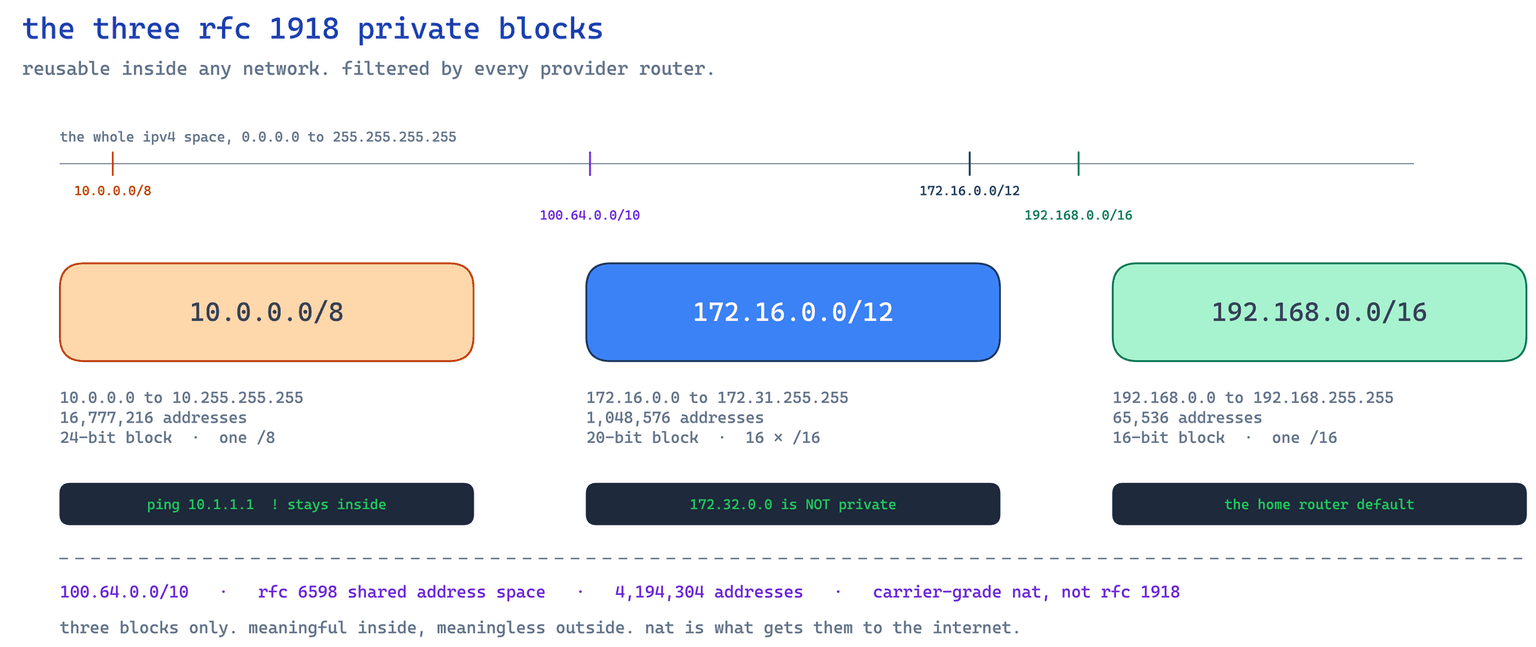
IPv4 has 4,294,967,296 addresses in total: generous in the 1980s, fatal by the mid 1990s. RFC 1918, published February 1996 and still Best Current Practice BCP 5, reserved three blocks any organisation may reuse internally.
| Block | Address range | Total addresses | RFC 1918 name |
|---|---|---|---|
| 10.0.0.0/8 | 10.0.0.0 to 10.255.255.255 | 16,777,216 | 24-bit block |
| 172.16.0.0/12 | 172.16.0.0 to 172.31.255.255 | 1,048,576 | 20-bit block |
| 192.168.0.0/16 | 192.168.0.0 to 192.168.255.255 | 65,536 | 16-bit block |
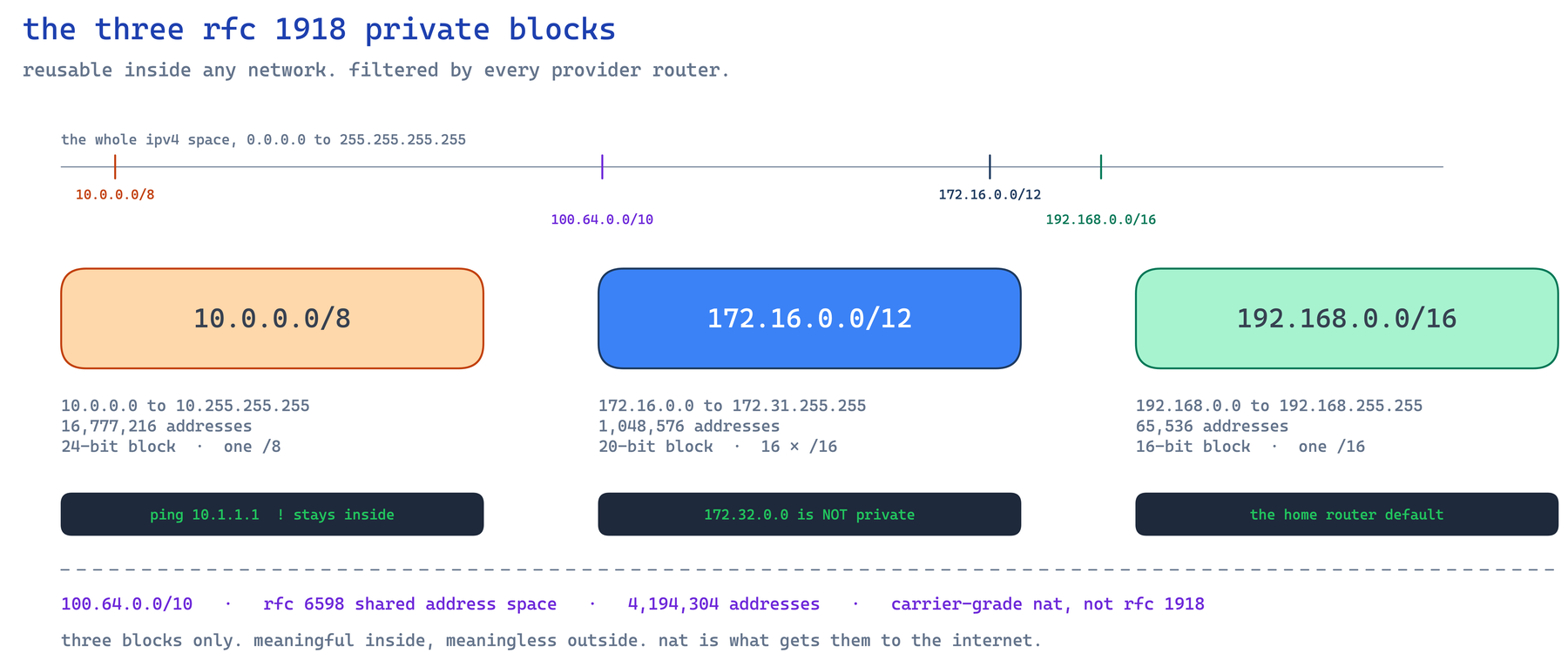
The middle block is the one people get wrong: 172.16 through 172.31 inclusive, not 172.32, and not a single /16. In class it is never a one-pass topic. Students accept 10.0.0.0/8 and 192.168.0.0/16 at once because the masks are familiar, then have to work /12 out on paper before 172.31.255.255 stops feeling arbitrary. Our subnetting guide and subnet calculator settle it fast.
These ranges never appear on the public internet. RFC 1918 tells operators not to propagate them across inter-enterprise links, and provider routers filter them, so a packet sourced from 192.168.1.10 dies upstream.
Inside local, inside global, outside local, outside global
Four terms, two questions, asked independently.
The inside or outside question asks whose network a host belongs to: your LAN PC is inside, a web server on the internet is outside, and that never changes as the packet moves.
The local or global question asks which side of the router you are standing on: local is how the address looks inside, global is how it looks outside.
Cisco defines inside local as the address assigned to a host on the inside network, usually not a public one, and inside global as the legitimate public address representing it to the outside world.
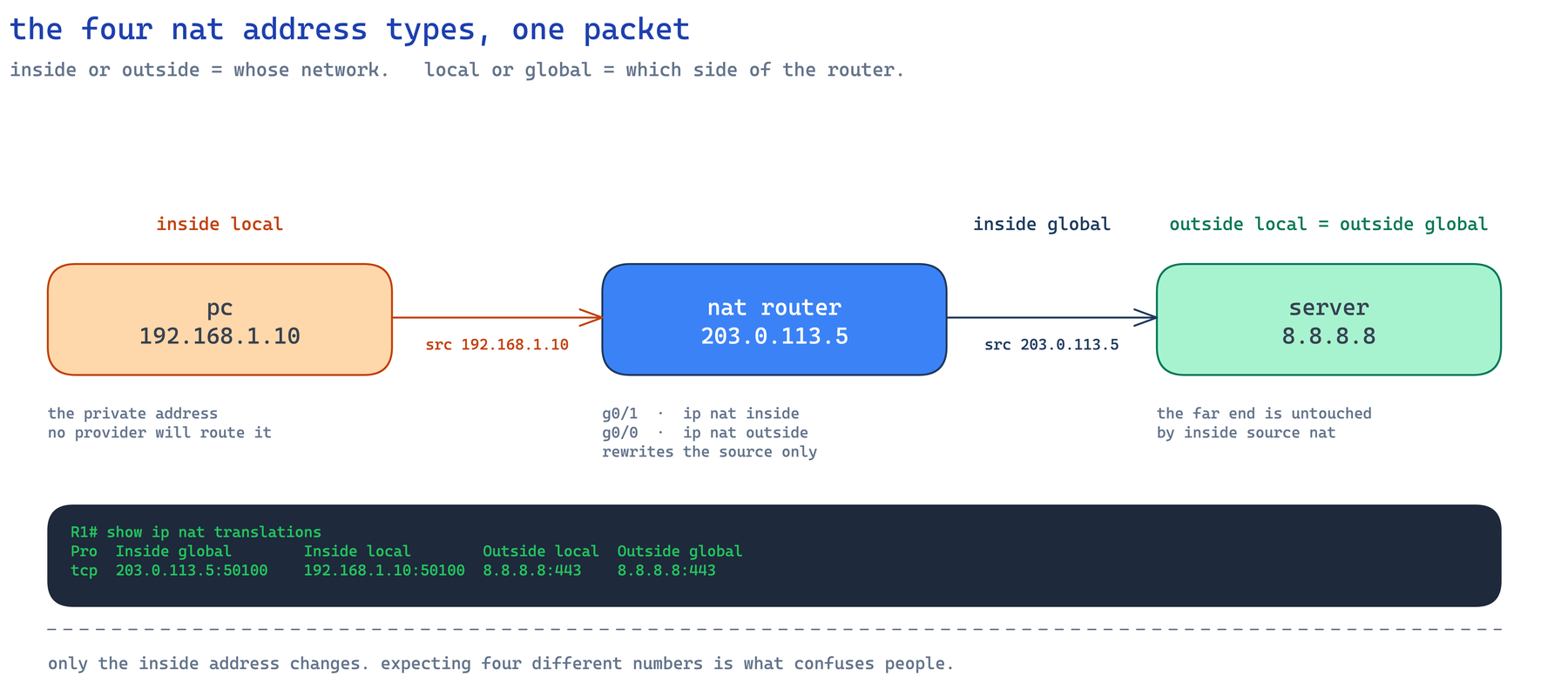
One packet: PC 192.168.1.10 reaches 8.8.8.8 through a router whose public address is 203.0.113.5. Inside local is 192.168.1.10, inside global 203.0.113.5, outside local and outside global both 8.8.8.8, because inside source NAT never touches the far end. Expecting four different numbers is the trap.
The term my classes miss most is inside global. Ask a room to label 203.0.113.5 and a good share of the hands write outside global, because the address sits on the interface pointing at the internet. The fix that sticks is making them answer the ownership question out loud first: the router is your device, so any address it presents on your behalf is inside, and only the far end is outside.
Static NAT: a permanent one-to-one mapping
Static NAT binds one inside local address to one inside global address permanently: ip nat inside source static 192.168.1.20 203.0.113.10. The mapping exists before traffic flows, so an outside host can open a session inward, which is why a DMZ web or mail server gets one. The entry shows --- in the protocol column and both outside columns.
There is a port-level form too, port forwarding: ip nat inside source static tcp 192.168.1.20 80 203.0.113.11 80 publishes only TCP 80 and leaves every other port unmapped. It is how a branch exposes one web server without spending a public address, and the only way an unsolicited session reaches an inside host on a site running PAT.
Dynamic NAT: a pool, first come first served
Dynamic NAT hands out addresses from a pool as inside hosts send traffic and reclaims them as entries age out. It is one-to-one at any instant, so it conserves addresses only to the extent that hosts are not all active at once: ten pool addresses serve ten simultaneous hosts, and the eleventh is dropped. It rations addresses over time; it does not multiply them.
That eleventh host matters: the router drops its packet, returns an ICMP destination unreachable, and the miss counter climbs. Plain dynamic NAT is therefore rare in production. Add overload and the same ten addresses serve the whole site.
PAT: how port numbers let many hosts share one public IP
PAT, Port Address Translation, which Cisco also calls NAT overload, rewrites the source port as well as the source IP, keying each translation on the full address and port tuple. Two inside hosts can share one public address and the return traffic still finds its way home. Its standards name is NAPT, defined in RFC 3022.
Cisco divides the ports per global IP into three ranges: 0-511, 512-1023 and 1024-65535. The router preserves the original source port where it can, takes the next free port in the same range when it is busy, and moves to another pool address once a range fills.
ICMP has no ports, so candidates conclude ping cannot survive PAT. It can: RFC 3022 maps the local ICMP query identifier to an assigned one, exactly as it maps ports. Our TCP vs UDP explainer covers the header fields PAT rewrites.
Configuring NAT on a Cisco router
Step one is marking the interfaces, the step people omit: one tagged NAT inside, one NAT outside. Without both, the config looks perfect and the table stays empty.
! 1. Interface roles, mandatory
interface GigabitEthernet0/1
 ip address 192.168.1.1 255.255.255.0
 ip nat inside
interface GigabitEthernet0/0
 ip address 203.0.113.5 255.255.255.252
 ip nat outside
! 2. ACL selects what gets translated (permit = translate)
access-list 1 permit 192.168.1.0 0.0.0.255
That ACL selects, it does not filter. A deny line means "do not translate", not "drop": the packet is still forwarded untranslated, dies upstream, and the engineer blames the wrong device. If wildcard masks are the sticking point, read our ACL explainer.
Now choose exactly one dynamic mapping. IOS accepts a single dynamic ip nat inside source list mapping per access list, so pasting a second returns %Dynamic mapping in use, cannot change. The three blocks below are alternatives, not a sequence.
! Option A: dynamic NAT
ip nat pool CISNET-POOL 203.0.113.20 203.0.113.29 netmask 255.255.255.240
ip nat inside source list 1 pool CISNET-POOL
! Option B: PAT onto that pool
ip nat inside source list 1 pool CISNET-POOL overload! Option C: PAT onto the outside interface, what branch routers run
ip nat inside source list 1 interface GigabitEthernet0/0 overloadNote that ip nat inside source is not ip nat outside source; inside source is the CCNA topic.
Build this lab in Packet Tracer
This is the exact topology behind every output on this page, and it takes ten minutes to draw.
| Device | Interface | Address | NAT role |
|---|---|---|---|
| PC1 | NIC | 192.168.1.10/24, gateway 192.168.1.1 | Inside local |
| PC2 | NIC | 192.168.1.11/24, gateway 192.168.1.1 | Inside local |
| R1 | Gi0/1 | 192.168.1.1/24 | ip nat inside |
| R1 | Gi0/0 | 203.0.113.5/30 | ip nat outside |
| ISP | Gi0/0 | 203.0.113.6/30 | None |
| ISP | Gi0/1 | 8.8.8.1/24 | None |
| Server | NIC | 8.8.8.8/24, gateway 8.8.8.1 | Outside global |
Build order:
- Cable two PCs through a switch to R1 Gi0/1, R1 Gi0/0 to ISP Gi0/0, the server to ISP Gi0/1.
- Address everything from the table, then confirm PC1 pings 192.168.1.1 and R1 pings 203.0.113.6 before touching NAT.
- Give R1 a way out:
ip route 0.0.0.0 0.0.0.0 203.0.113.6. - On ISP, give the pool a way back:
ip route 203.0.113.16 255.255.255.240 203.0.113.5. Skip it and Options A and B look broken while Option C works. - Paste the interface and ACL block, then one of Option A, B or C.
- Ping 8.8.8.8 from both PCs, then run the two show commands below on R1.
Verifying with show ip nat translations
Configuration is not evidence. These two commands are, and an exam simulation will ask you to read them.
R1# show ip nat translations
Pro  Inside global         Inside local        Outside local       Outside global
---  203.0.113.10          192.168.1.20        ---                 ---
tcp  203.0.113.5:50100     192.168.1.10:50100  8.8.8.8:443         8.8.8.8:443
tcp  203.0.113.5:50101     192.168.1.11:50100  8.8.8.8:443         8.8.8.8:443
icmp 203.0.113.5:9         192.168.1.13:9      8.8.8.8:9           8.8.8.8:9
R1# show ip nat statistics
Total active translations: 4 (1 static, 3 dynamic; 3 extended)
Outside interfaces: GigabitEthernet0/0
Inside interfaces: GigabitEthernet0/1
Hits: 3228980 Misses: 3Row one is the static entry, row two PAT preserving source port 50100, row three a second host that also chose 50100 reassigned to 50101, row four ICMP keyed on a query identifier. In the statistics, "extended" counts entries carrying protocol and port information, which is why a static port-forwarding entry counts in both columns.
Read the ports, not the addresses, to tell the modes apart. No ports and a --- protocol column is static NAT. Distinct inside globals with untouched ports is dynamic NAT. One inside global carrying many ports is PAT.
Entries age out too. The default ip nat translation timeout is 86400 seconds, 24 hours; TCP drops to 60 seconds once a FIN or RST is seen, UDP after 300 seconds, DNS after 60.
When the translation table is empty
This is the first failure almost every class hits, usually a minute after finishing the config.
R1# show ip nat translations
R1#
R1# show ip nat statistics
Total active translations: 0 (0 static, 0 dynamic; 0 extended)
Outside interfaces: GigabitEthernet0/0
Inside interfaces:
Hits: 0  Misses: 0
Two lines give it away. The table is empty, and the Inside interfaces: line has nothing after it, because ip nat inside never made it onto Gi0/1. Misses is 0 as well: the router is not failing to translate, it is not trying, because a packet arriving on an untagged interface is never a NAT candidate. Misses climbing means the ACL or pool is wrong; Misses frozen at 0 means the interface tags are.
I have watched that blank line end a twenty minute hunt through ACLs and pools that were fine all along, in class and on production edge routers, which is why I teach show ip nat statistics before show ip nat translations. Then walk the ladder: are both interfaces marked, does the ACL permit the source, is there a route to the destination, is the pool exhausted, is an inbound ACL blocking the return. Clear stale entries with clear ip nat translation *.
The order of operations that explains most NAT failures
Cisco's documented packet order is direction-dependent and easy to get backwards. Inside to outside: policy routing, routing, NAT local to global, then the output access list. Outside to inside: translate global to local, then route. Outbound traffic therefore needs a route to the destination before translation happens, and "NAT is configured and nothing works" is usually a missing default route. Cisco's NAT order of operation document lists both sequences.
Where NAT sits in your CCNA study plan
At CISNET, NAT is a lab rather than a slide. Our live instructor-led CCNA course covers NAT, PAT and DHCP in a module called NAT, DHCP, WAN and Security, and you build the topology above in Packet Tracer and on real Cisco gear over 8 Saturdays. Our CCNA study guide sequences all six domains around it.
Five questions before you sit the exam
Answer these from memory first. The full bank lives in our free CCNA practice questions tool.
- R1 translates PC 192.168.1.10 out of its public interface 203.0.113.5. Which address type is 203.0.113.5? Answer: inside global. The router is your device, so inside; the outside world sees it, so global.
show ip nat statisticsreports 0 translations, 0 hits, 0 misses, with a pool and ACL configured. What is missing? Answer: an interface tag. Misses stuck at 0 means no packet was ever a NAT candidate.- Ten hosts use a ten-address pool with
ip nat inside source list 1 pool CISNET-POOL. An eleventh opens a browser. Answer: no translation is free, the router drops the packet and Misses increments.overloadfixes it. - Is 172.32.0.0 an RFC 1918 address? Answer: no. The block is 172.16.0.0/12, which ends at 172.31.255.255.
- An entry reads
tcp 203.0.113.5:50101 192.168.1.11:50100. Why do the ports differ? Answer: PAT tried to preserve 50100, found another host already using it on that global address, and took the next free port.
Sources
The primary references this guide relies on:
- RFC 1918, private address space, and RFC 6598, shared address space.
- RFC 3022, Traditional IP Network Address Translator.
- Cisco's NAT order of operation.
- Cisco's 200-301 v1.1 exam topics, topic 4.1, and v2.0 exam topics, topic 4.3.
Frequently Asked Questions
Is PAT the same thing as NAT overload?
Yes. PAT and NAT overload name the same Cisco feature, enabled by the overload keyword on an ip nat inside source list command. The standards name is NAPT, Network Address Port Translation, from RFC 3022, which never uses the term PAT; Cisco's CCNA v1.1 wording does not either, so learn all three names.
Why is my NAT translation table empty?
Because the packets never became NAT candidates, which on a config that otherwise looks correct almost always means an interface is missing its ip nat inside or ip nat outside tag. Run show ip nat statistics first: if the Inside interfaces line is blank and Misses is 0, it is the tag, not the ACL. If Misses is climbing, the ACL is not permitting your source subnet or the pool is exhausted.
Why is 100.64.0.0/10 not an RFC 1918 private range?
Because it belongs to RFC 6598, which defines it as Shared Address Space for carrier-grade NAT, distinct from RFC 1918 space because it is meant for Service Provider networks and numbers the link between a provider CGN and customer equipment. RFC 1918 reserves exactly three blocks: 10.0.0.0/8, 172.16.0.0/12 and 192.168.0.0/16.
Does NAT make my network more secure?
No, and treating it as a security control is a mistake. Outside hosts cannot reach inside hosts through dynamic NAT or PAT only because no translation entry exists for an unsolicited inbound packet, a side effect rather than a policy. One static mapping exposes that host. Both RFC 1918 and RFC 3022 frame NAT as address conservation.
How many hosts can share one public IP address with PAT?
Thousands of concurrent sessions per public address, but Cisco publishes no flat maximum and you should not quote one. The ceiling depends on how the router divides the port space per global IP into the ranges 0-511, 512-1023 and 1024-65535, on the traffic mix and on platform limits.
Does PAT break ping, since ICMP has no port numbers?
No, ping works through PAT. For ICMP queries RFC 3022 maps the local IP address and ICMP query identifier to a registered address and an assigned identifier, so that identifier disambiguates return traffic the way a source port does for TCP and UDP.
Which NAT topics are on CCNA 200-301 v1.1 versus v2.0?
On v1.1, NAT is topic 4.1, "Configure and verify inside source NAT using static and pools", inside the 10% IP Services domain, with private addressing at topic 1.7; Cisco's wording never says PAT. On v2.0 it becomes topic 4.3, "Configure NAT/PAT on IOS XE routers", inside a 20% domain called Network Services and Security, which names PAT explicitly. Cisco has fixed the cutover: v1.1 can be taken through February 2, 2027, and v2.0 from February 3, 2027.


